


 CaliContrO MCA02
From Calibration to Creation
3-in-1 Colorimeter
CaliContrO MCA02
From Calibration to Creation
3-in-1 Colorimeter

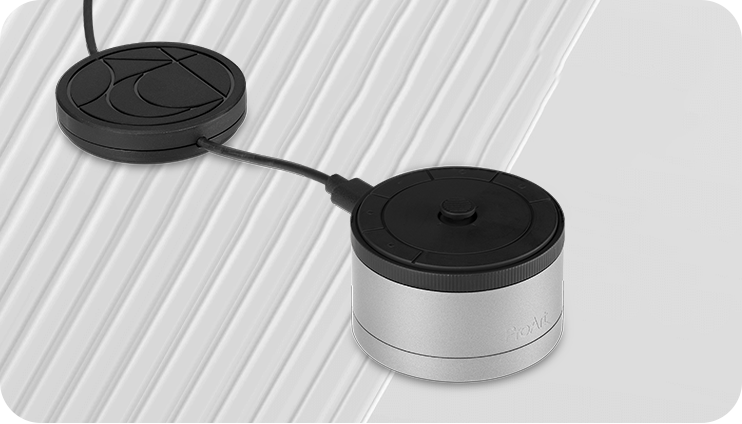
The versatile ProArt CaliContrO MCA02 three-in-one colorimeter works with ASUS-exclusive apps for hardware and software calibration. It also supports the generation of ICC profiles for conventional monitors and laptop screens, enabling comprehensive color management across a wide range of devices. On-Screen Display (OSD) control via MCA02 enables quick adjustments when connected to a compatible monitor, with vibration feedback for enhanced usability. Built-in ASUS Dial features offers instant and precise control for Adobe apps and other applications by enabling customized shortcuts.
Empowering Content Creators

Color Calibration
Keep long-term color accuracy conveniently within easy reach via Hardware / Software Calibration

OSD Control
Enjoy effortless control with a 5-way navigator and shortcut keys at your fingertips, with vibration feedback

ASUS Dial Features
Creativity with a spin — fully customizable and seamlessly compatible with creative software
Professional
Color Accuracy
ProArt CaliContrO MCA02 offers industry-leading precision and is designed specifically for professional display needs.
High Brightness Measurement
Supports up to 10,000 nits, ensuring precise calibration for HDR displays without compromise
Seamless ProArt Display Integration
With built-in ProArt Display color profile support, it works seamlessly with ProArt monitors to deliver optimized and more accurate calibration
Broad Panel Compatibility
Works flawlessly with multiple display technologies including LED, OLED, Mini-LED, and more

Keep Long-term Color Accuracy
ProArt CaliContrO is a high-precision color colorimeter that can be used with any monitors/laptops for software color calibration to generate ICC Profile and also be perfectly matched with ProArt Display which support Hardware Calibration feature via ProArt Calibration software. ASUS exclusive ProArt Calibration software supports Windows OS and macOS, ensuring compatibility and seamless integration across different platforms.
Software Calibration
ProArt CaliContrO MCA02 can do software calibration via ProArt Calibration software to generate an ICC Profile. An ICC Profile is a file that contains color management information, which can be used by the operating system and other applications to ensure consistent color output across different devices. By creating an ICC Profile, users can ensure that the colors displayed on their ASUS monitor are true to life and match the intended output.
Learn More
Hardware Calibration
ProArt CaliContrO MCA02 also work seamlessly ASUS ProArt Calibration software with ProArt Displays can be calibrated and the 3D LUT (Look-up Table) subsequently rewritten. It can write back and saves color parameter profiles on the ProArt display’s internal scaler IC chip, instead of on the PC, allowing users to connect it to devices with different operating systems or applications without needing to adjust settings. The saved profiles can be easily activated via the hotkey on the monitor.
Learn More
Versatile Display Control
ProArt CaliContrO features On-Screen Display (OSD) control, ASUS Dial, and Microsoft Surface Dial integration, providing users with versatile and intuitive ways to adjust display settings for optimal performance. You can switch these three functions via ASUS DisplayWidget Center.
ASUS DisplayWidget Center Learn More*Shortcut keys position and shortcut items depends on model.

ContrO
Instant & Effortless Access
ProArt CaliContrO can be connected to a compatible monitor to provide direct access to the On-Screen Display (OSD) for quick adjustments with vibration feedback. Featuring 5-way navigator and 5 button shortcut keys including input select, shortcut 1, shortcut 2, exit and vibration switch, it delivers intuitive control, so you no longer need to reach your hand to the monitor.
*Shortcut keys position and shortcut items depends on model.

Creativity with a Spin
In addition to OSD control for ProArt displays, the virtual ASUS Dial on ProArt CaliContrO offers seamless integration with creative software and Microsoft Surface Dial controls, empowering creators with intuitive adjustments and streamlined workflows. Seamless switching between functions is enabled via ASUS DisplayWidget Center, further enhancing usability and customization.
Learn More
Works with Creative Software
Discover new ways to create with the exclusive ASUS Dial — a virtual touch dial that delivers instant, precise fingertip control over parameters in creative apps. Customized shortcuts let creators zoom in and out of images or adjust brush size simply by turning the dial. The default interface can also be personalized to match individual workflows and preferences.
ASUS Dial & Control Panel Download
*ASUS Dial & Control Panel for Microsoft Windows only
Supports Windows Surface Dial
ASUS Dial works seamlessly with Microsoft Surface Dial features. Simply turn ASUS Dial to adjust volume, scroll through web pages, or to perform other functions.
ASUS Dial & Control Panel Download
*ASUS Dial & Control Panel for Microsoft Windows only

Exquisite Design
The ProArt CaliContrO MCA02 combines sleek industrial aesthetics with intuitive interaction, giving creators a natural control experience.



FAQ
-
ProArt CaliContrO supports software calibration for industry-standard monitors and laptops, ensuring broad compatibility with various panel types, including LED, OLED, Mini-LED, and more, to generate accurate ICC profiles. It also supports hardware calibration for selected ProArt displays.
-
ProArt Calibration software supports both Windows OS and macOS, ensuring cross-platform compatibility and integration.
-
Software Calibration uses a colorimeter to create ICC profiles, while Hardware Calibration directly can write back into ProArt Displays internal IC LUT (Look-up Table), delivering more accurate and long-term stable color performance.
-
You can check if your ProArt Display supports hardware calibration by referring to the official ProArt Display list at the following link: https://www.asus.com/displays-desktops/monitors/proart/filter?Spec=493
-
It is generally recommended to calibrate your monitor every 4 to 6 weeks, or immediately if you notice significant changes in brightness or color accuracy. For professional imaging, design, or printing work, more frequent calibration may be necessary to maintain precise color performance.
-
To ensure optimal color accuracy with your existing equipment, the ProArt Calibration software includes a "Color Correlation" function that allows you to calibrate the ProArt CaliContrO using your preferred colorimeter.
-
You can switch between these three functions using the ASUS DisplayWidget Center. It supports both Windows and macOS, and you can also customize OSD shortcut keys through the ASUS DisplayWidget Center. Please note that ASUS Dial and Microsoft Surface Dial are only supported on Windows OS. Learn more about ASUS DisplayWidget Center : https://www.asus.com/content/monitor-software-osd-displaywidgetcenter/
-
ProArt CaliContrO MCA02 works seamlessly with ASUS’s exclusive ProArt Calibration software and Light Illusion ColourSpace CMS. We’re continuously expanding support for more calibration tools and invite developers to integrate ProArt CaliContrO for even broader compatibility.

