1. Turn the router off. 2. Press and hold the "WPS" button and turn the router on. 3. Power light is on(keep holding the WPS button). 4. Release the WPS button after the power LED light starts flashing. 5. Power light stops flashing and the router will automatically reboot.
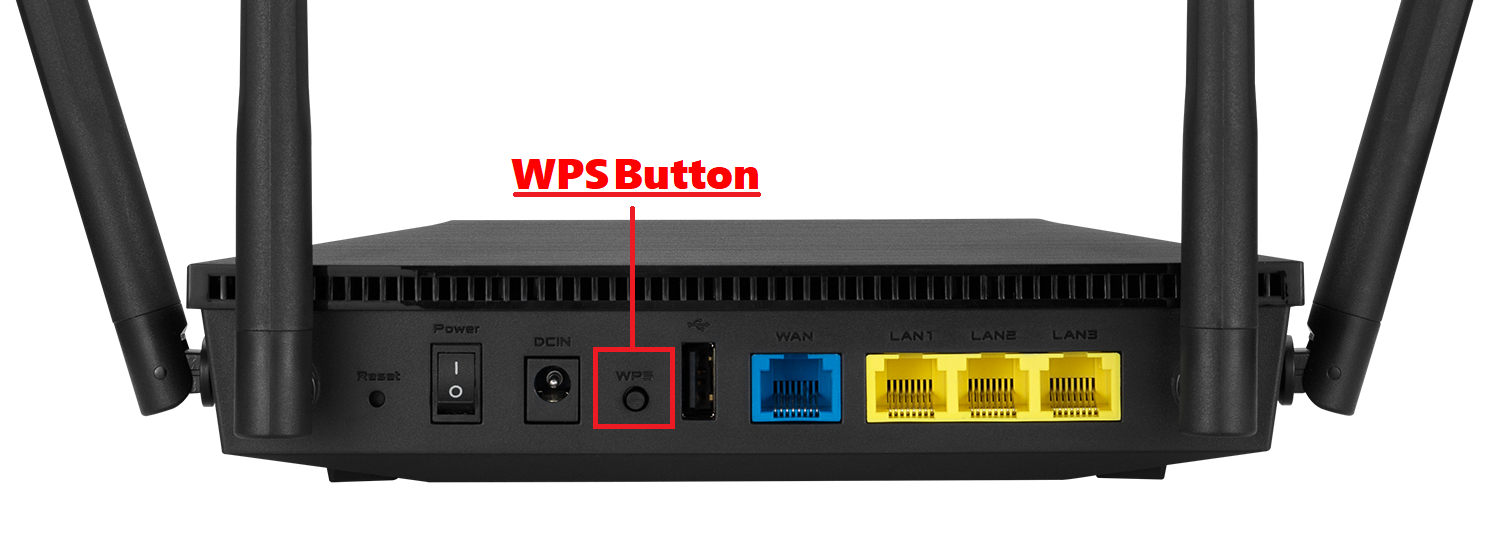
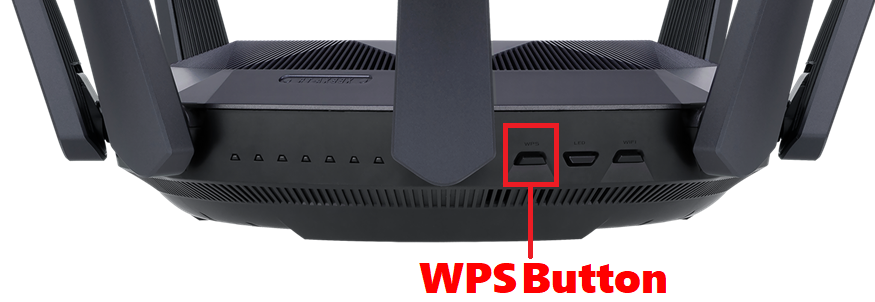
Find the WPS button on your router, kindly refer to the following picture.
Different models might have slight differences. If you have any question ,please check the user manual
1. The following picture takes [RT-AX53U] as an example.
2. The following picture take [RT-AX89X] as an example.
يُرجى التواصل معنا إذا لم تساعد المعلومات الواردة أعلاه في حل مشكلتك.
معلومات الواردة أعلاه قد تكون مقتبسة جزئيا أو كليا من المواقع الخارجية أو المصادر. يرجى الرجوع إلى المعلومات استنادا إلى المصدر الذي لاحظناه. يرجى الاتصال مباشرة أو الاستفسار عن المصادر إذا كان هناك أي سؤال آخر ونلاحظ أن أسوس ليست ذات صلة ولا مسؤولة عن محتواها / الخدمة
قد لا تكون هذه المعلومات مناسبة لجميع المنتجات من نفس الفئة / السلسل