[Phone] How to enable VoLTE
Note: 1. Confirm with your phone service carrier if your location, your account and your phone model can support VoLTE service. Also, the numbers you are calling need to meet these requirements so you can use VoLTE service.
Some carriers support VoLTE only in certain cities or area codes. Contact your carrier to inquire about your area and account.
2. This function is only available in some models.
Enable VoLTE
1. Go to Settings > Network & internet > Internet.
2. Tap settings icon beside SIM.
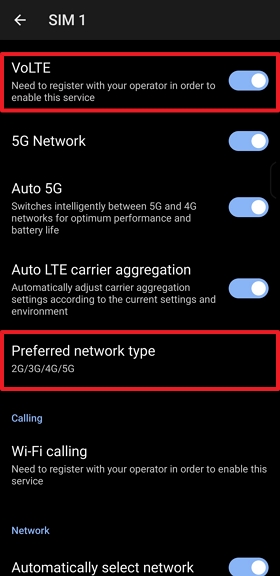
3. Enable Volte to use Volte service and select Preferred network type include 4G.
Enable/Disable Wi-Fi Calling (VoWiFi)
Go to Settings > Network & internet > Internet > Tap the SIM settings icon > Tap Wi-Fi calling > Toggle the Use Wi-Fi calling switch to enable or disable the feature.
Common Troubleshooting Steps for VoLTE Usage Issues
If you experience connection problems or poor call quality while using the VoLTE feature, please follow these steps to check and resolve the issue:
• Ensure VoLTE is Enabled
Please check in your phone settings to confirm that the VoLTE option is enabled.
• Restart Your Phone
Turn off your phone and turn it back on to help reinitialize the network services.
• Reinsert the SIM Card
Remove the SIM card and reinsert it to ensure proper contact between the SIM card and the card slot.
• Check Your Network Mode Settings
Go to: Settings > Network & internet > SIM Card > Select Your SIM Card > Preferred network type.
Ensure the setting is set to 5G/4G (Auto) rather than 3G/2G (Auto).
• Ensure No Apps are Interfering with VoLTE
Apps such as VPNs, call recording apps, or firewall apps may interfere with your network connection. Please disable or adjust the settings of any such apps and test again.
• Check APN (Access Point Name) Settings
Verify that your APN settings are correct. If there are any changes, it is recommended to revert to the default settings provided by your carrier.
• Reset Mobile Network Settings
Go to: Settings > System > Reset options > Reset Mobile Network Settings.
• Update Your Phone's System to the Latest Version
Go to: Settings > System > System updates > Check Update.
• Confirm with Your Carrier if VoLTE is Activated on Your Number
If VoLTE is not activated on your number, you will not be able to use the service. Please contact your carrier to confirm.
• Check with Your Carrier About Local VoLTE Coverage
If local VoLTE coverage is insufficient, it may affect your usage experience.
Tip: If VoLTE signal is especially weak indoors, it could be due to strong shielding effects from the building (such as metal structures or reinforced concrete).