[Phone] How to enable and set Notifications function?
[Phone] How to enable Notifications function for the apps ?
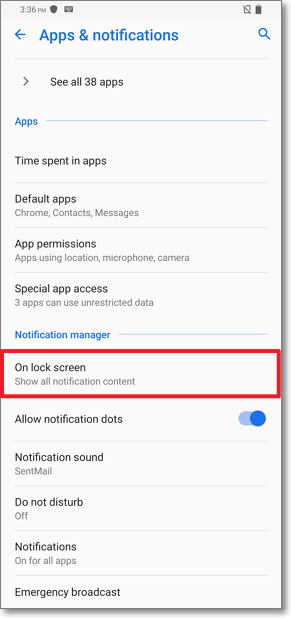
[Phone] How to enable the notifications function to On lock screen ?
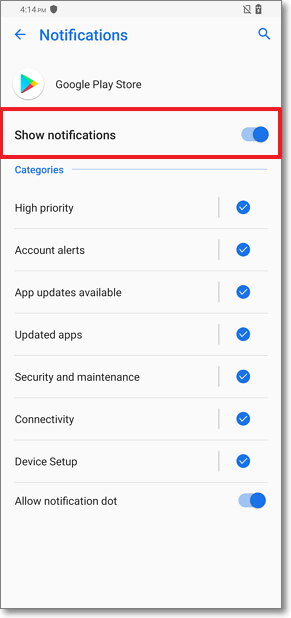
[Phone] How to enable Notifications function for the apps ?
1. Please follow the steps below to enable the function:
In Android 7.0:go to "Settings" > "Notifications"
In Android 8.0:go to "Settings" > "Apps & notofocations" > "Notifications"
In Android 9.0:go to "Settings" > "Apps & notofocations" > "Notifications"
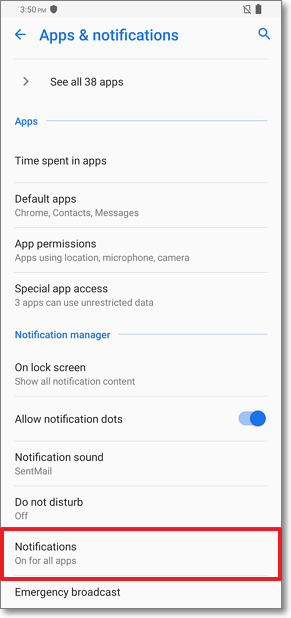
2. Turn on the apps which you want to enable the notifications function
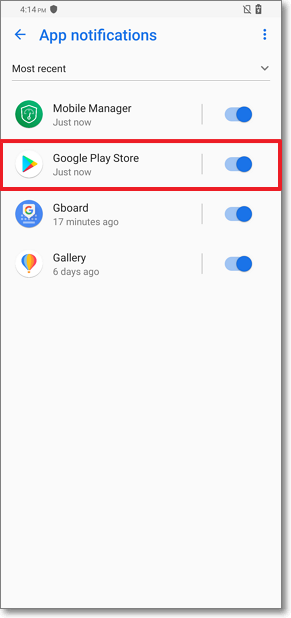
3. Turn on "Show notifications" option to enable the Notifications function for the apps
[Phone] How to enable the notifications function to On lock screen ?
1. In Android 8.0/9.0:go to "Settings" > "Apps & notifications" "On lock screen"
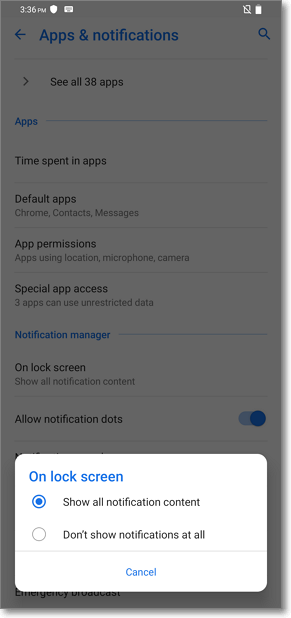
2. Click "On lock screen", you can enable the function by selecting "Show all notification content" or select "Don't show notifications at all" to disable the function.