


免光碟安裝 Plug-n-surf
針對更好的傳輸範圍,增加了5dBi天線
節能省電: 減少待機模式的耗電量
支援 EZ WPS 連結
Consistently Praised for Networking Excellence!

Readers’ Choice, 6 Years Running! (2012-2017)
“No brand is more likely to be recommended than ASUS. The company receives excellent marks for their ease of setup and reliability.”– PC Magazine
>>Learn more.

Recommended Excellence Award for Best Router Brand, PC Pro Technology Excellence Awards 2016.

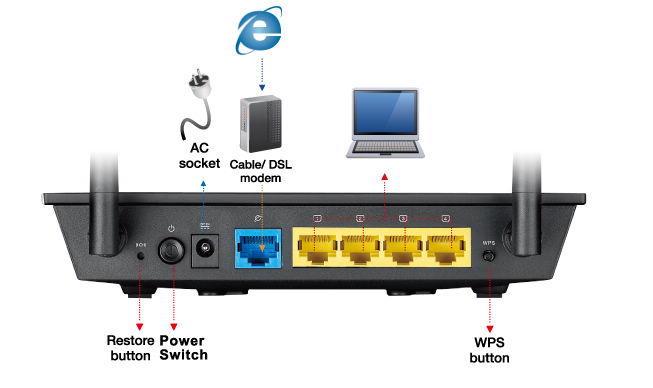
ASUS RT-N12E supports 802.11 b/g/n and has 300 Mbps high speed. With CD free easy installation and stable data transmission, RT-N12E is the basic solution for wireless internet setup. It also contents Green WLAN technology so it consumes less power during stand by mode.
 |
||
| Step1: | Step2: | Step3: |
| Power up the router and launch the browser | Enter the information provided by your ISP | Start surfing! |
Plug-n-Surf Installation
3-steps is all you need to set up the router. You don't need a CD for installation.
Save The Planet And Your Pocket
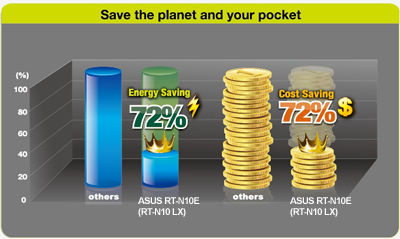
Compared with generic Wireless-N routers, ASUS ECO-WiFi CPU reduces 72%* of energy consumption and utility cost.
* The result given was of an internal testing methods comparing typical router, with standby, normal and heavy traffic. Testing criteria: [Standby mode] Only WAN ports are connected. [Normal traffic] 1 wired connected PC and 1 wirelessly connected laptop for P2P download. [Heavy traffic] 4 wired connected PCs and 2 wirelessly connected laptops for P2P download. Utility cost is calculated based on 2011 US household avg. electricity price, all taxes included.
Extended Network Coverage
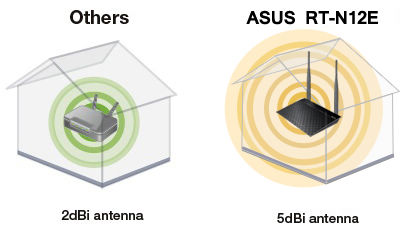
The RT-N12E features a 5dBi high-gain antenna that boosts the wireless signal, thereby extending coverage range.
*Antenna type will differ according to local regulations and requirement in each country.
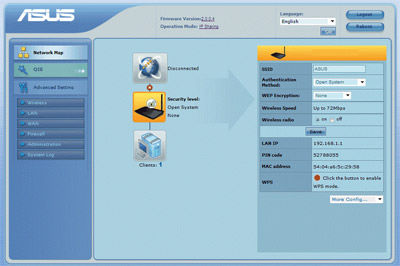
Network Map-Manual Free Management
- Have a quick overview of the whole network and WAN/LAN status
- Manage your network in minutes
- Try our EZ UI software
WPS Function& WPA/WPA2 Encryption
WEP encryption is not enough for Wi-Fi connection nowadays, and intruders may be able to access your network.Using the WPS function with WPA/WPA2 encryption improves protection for your home networks and private resources.
Keep Up to Date!
Remember to always keep your device’s firmware up to date so you can benefit from the very latest service and security enhancements — and get exciting new features! Learn more about updating new firmware.
*This product does not support universal repeater mode. If needed, please find RT-N10U, RT-N12, RT-N13U, or RT-N15U.
* ASUS received the highest numerical score among wireless routers in the J.D. Power 2015 Wireless Router Satisfaction Report, based on 2,716 responses from 8 companies measuring satisfaction with wireless routers surveyed November-December 2015. Your experiences may vary. Visit jdpower.com


- 經FCC和加拿大工業部認證的產品將在美國和加拿大銷售。請參閱華碩美國和華碩加拿大網站,瞭解有關當地可用產品的資訊。
- 所有規格如有更改,恕不另行通知。請與您的供應商/經銷商確認確切的報價。產品可能並非在所有市場都可用。
- 規格和功能或內建軟體因型號而異,所有圖像僅供參考。有關完整詳細資訊,請參閱規格頁面。
- 產品顏色可能會因拍照光線誤差或螢幕設定而與實際產品有所差異。
- 商標聲明:本網站所談論到的產品名稱僅做識別之用,而這些名稱可能是屬於其他公司的註冊商標或是版權。
- HDMI、HDMI高畫質多媒體介面及HDMI 標誌為HDMI Licensing Administrator, Inc.在美國及其他國家的商標或註冊商標。
- The actual transfer speed of USB 3.0, 3.1, 3.2, and/or Type-C will vary depending on many factors including the processing speed of the host device, file attributes and other factors related to system configuration and your operating environment.
- Actual data throughput and WiFi coverage will vary from network conditions and environmental factors, including the volume of network traffic, building material and construction, and network overhead, result in lower actual data throughput and wireless coverage.
- Quoted network speeds and bandwidth based on current IEEE 802.11ac specifications. Actual performance may be affected by network and service provider factors, interface type, and other conditions. Connected devices must be 802.11ac-compatible for best results.
