[NUC] NUCのフロントパネルヘッダー
Most, but not all, NUC motherboards have a 9-pin or 11-pin (2.0 mm pitch) front panel header. This header is on the processor/fan side of the motherboard. You can connect a power switch to this header to remotely power on or reset an Intel NUC board that is embedded (such as in a kiosk) in a position in which the chassis' power switch isn't easily accessible.
Click or the topic for details:
9-pin header information
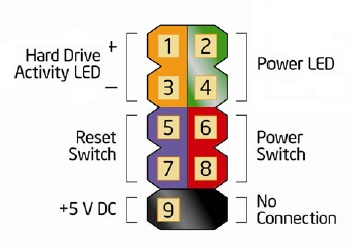
Pin assignments:
| Pin | Description | In/Out | Pin | Description | In/Out |
| ハードディスク活動LED | 電源LED | ||||
| 1 | ハードディスクLEDプルアップ+5V | アウト | 2 | フロントパネルグリーンLED(5V) | アウト |
| 3 | ハードディスクアクティビティLED | アウト | 4 | フロントパネルイエローLED(5V) | アウト |
| リセットスイッチ | オン/オフスイッチ | ||||
| 5 | グラウンド | 6 | 電源スイッチ | イン | |
| 7 | リセットスイッチ | イン | |||
11ピンヘッダー情報
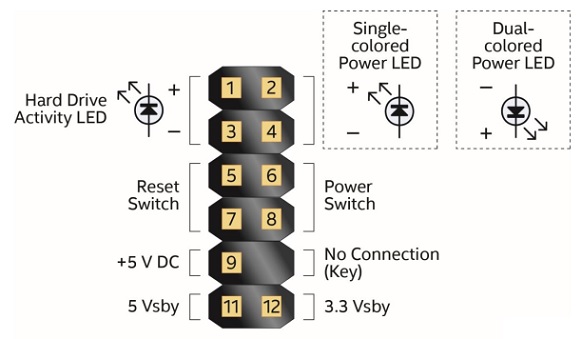
ピンアサイン:
| ピン | 説明 | イン/アウト | ピン | 説明 | イン/アウト | ||||||||||||||||||||||||
| ハードディスクアクティビティLED | 電源LED | ||||||||||||||||||||||||||||
| 1 | ハードディスクLEDプルアップ+5V | アウト | 2 | フロントパネルLED(メインカラー) | アウト | ||||||||||||||||||||||||
| 3 | ハードディスクアクティビティLED | アウト | 4 | フロントパネルLED(代替カラー) | アウト | ||||||||||||||||||||||||
| リセットスイッチ | オン/オフスイッチ | ||||||||||||||||||||||||||||
| 5 | グラウンド | 6 | 電源スイッチ | イン | |||||||||||||||||||||||||
| 7 | リセットスイッチ | イン | 8 | グラウンド | |||||||||||||||||||||||||
| 電源 | 未接続 | ||||
| 9 | +5 V DC - VCC5(1A電流定格) | 10 | ピンなし | ||
| スタンバイ電源 | |||||
| 11 | 5 Vスタンバイ - 2A電流定格 | 12 | 3.3 Vスタンバイ(1A電流定格) | ||
サポートにお問い合わせ
上記の情報で問題が解決しない場合は、お問い合わせください。
- Above information might be partly or entirely quoted from exterior websites or sources. please refer to the information based on the source that we noted. Please directly contact or inquire the sources if there is any further question and note that ASUS is neither relevant nor responsible for its content/service
- This information may not suitable for all the products from the same category/series. Some of the screen shots and operations could be different from the software versions.
- ASUS provides the above information for reference only. If you have any questions about the content, please contact the above product vendor directly. Please note that ASUS is not responsible for the content or service provided by the above product vendor.