Product
ELMGR7093DX4, ELMGR7093DX6, ELMGR709HXX4, ELMGR709HXX6, GR70, MINIPC PB50, MINIPC PB60V, MINIPC PB61V, MINIPC PB62, MINIPC PN52, MINIPC PN80, PA90, PB40, PB40-B, PB50, PB50-B, PB60, PB60-B, PB60G, PB60S, PB60S-B, PB60V, PB61S, PB61V, PB61V-B, PB61V-H, PB62, PB62-B, PB63, PB63-B, PB63V, PB64, PB64-B, PL63, PL63-A, PL63-B, PL64, PL64-B, PL64-D1, PL64-D1-B, PN30, PN40, PN40Q, PN41, PN41-A, PN41-B, PN41-S1, PN41-S1-B, PN41-S1-M, PN41-S1-MI, PN42, PN42-B, PN42-E1, PN42-E1-B, PN42-M, PN42-S, PN42-S-B, PN43, PN43-B, PN43-S, PN43-S-B, PN50, PN50-B, PN50-E1, PN50-E1-B, PN50-F, PN50F2, PN50-S1, PN51, PN51-B, PN51-E1, PN51E1-B, PN51-S1, PN51-S1-B, PN52, PN52-B, PN53, PN53-B, PN53-S1, PN53-S1-B, PN54, PN54-B, PN54-S1, PN54-S1-B, PN60, PN60-B, PN60-R, PN61, PN61-B, PN61S, PN61T, PN62, PN62-B, PN62S, PN63, PN63-B, PN63-S1, PN63-S1-B, PN64, PN64-B, PN64-E1, PN64-E1-B, PN64-M, PN65, PN65-B, PN80, PN865
[Mini PC] How to FInd the Mini PC or Vivo PC Serial Number
- Check the sticker label on the bottom of the Mini PC or Vivo PC. The serial number is listed after the word “Serial No,” “Serial Number,” “SSN,” “S/N,” or “SN” as in the edited picture below.
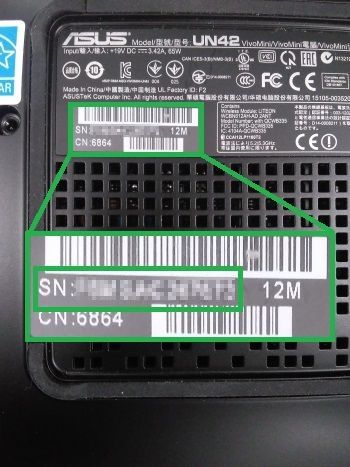
- Check for a similar label in the warranty card. The serial number is listed after the word “Serial Number,” “SSN,” “S/N,” or “SN” as in the edited picture below.

- Check the sticker label on the side of the package box. The serial number is listed after the word “Serial Number,” “SSN,” “S/N,” or “SN” as in the edited screenshot below.

- If you can boot to Windows, run 'command prompt' and type 'wmic bios get serialnumber' as below.

- If you previously registered your product under your ASUS account, check there as well.