|
ASUS Aura Ready Game SDK Developer's Guide
|


|
|
ASUS Aura Ready Game SDK Developer's Guide
|
|
Pressing "Z", all aura sync devices will show default "Menu Idle" event animation.
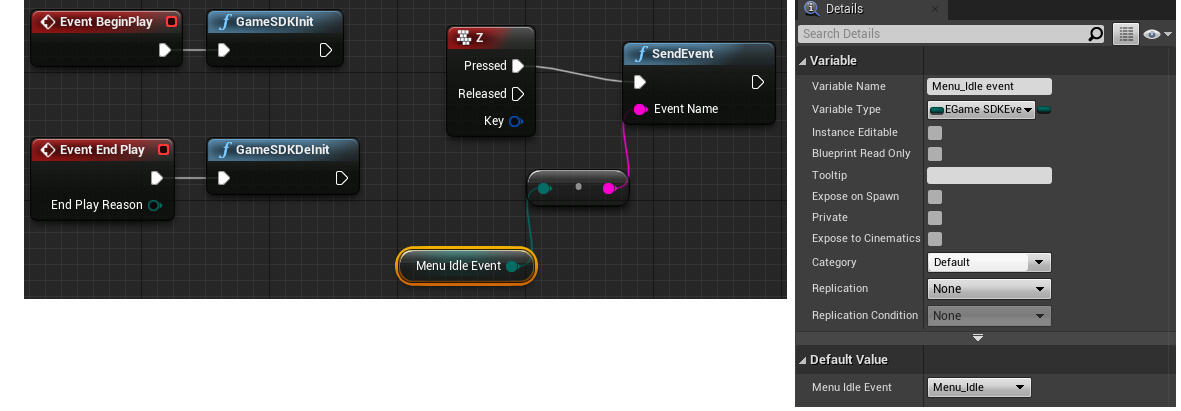
Pressing "Z", all aura sync devices will show default "Menu Idle" event animation. Then pressing "D", "Menu Idle" event will stop in last frame, but it won’t clear light.
If needed to clear all devices light, just send "Full_black" event again without delete event.

While game starting, bind health event first to notify GameSDK. In this time, device light won't do anything.
Pressing "Z", all devices show default "Menu Idle" event animation.
Pressing "H", update health event level as "High". "Menu Idle" animation still running but the F1~F12 keys on the Keyboard and notebook keyboard are overlayed by green color.

If want to use Fkey to bind hotkey event, reference following example.
Pressing "Q", the Fkey "1" will light as yellow color.

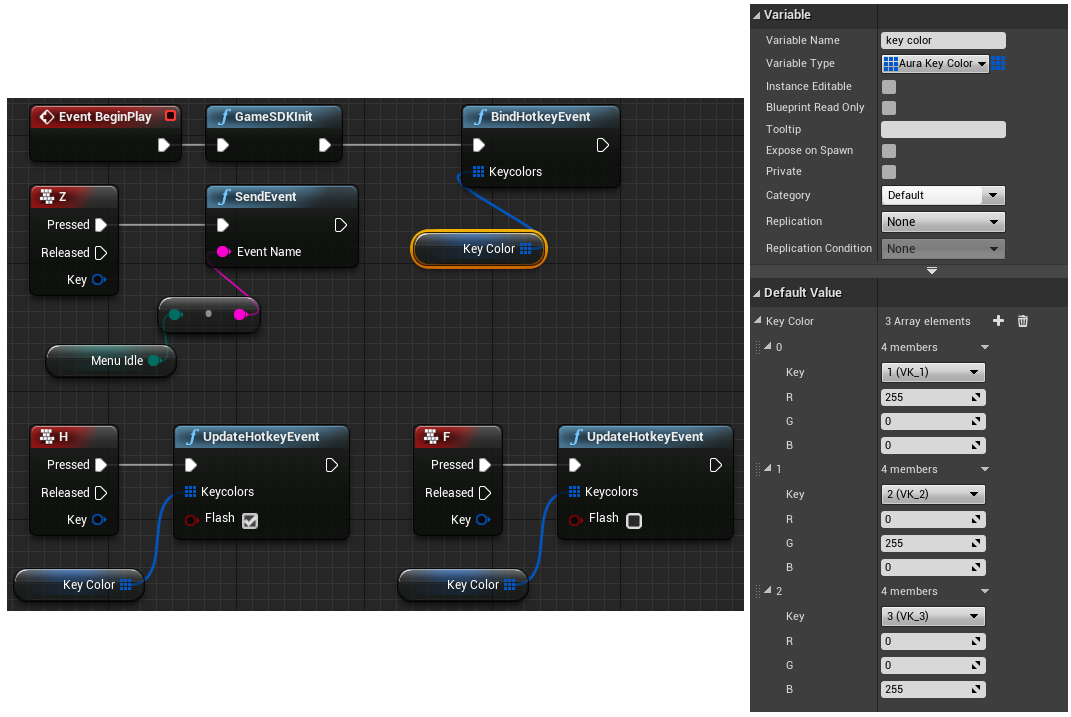
While game starting, bind hotkey event with key "1", "2", "3". In this time, the key "1" light as red, key "2" light as green, and key "3" light as blue.
Pressing "Z", all devices show default "Menu Idle" event animation. But these hotkeys "1", "2" and "3" still keep original color.
Pressing "H", the three hotkeys will start flash. Press "F", the three hotkeys will stop flash.
If player changed hotkey while in game, using delete event API to delete hotkey event and re–bind hotkey event again.
Before using RegisterEvent API, it needed to copy gif into Content folder of UE4 game project.
Because only two–dimension devices (keyboard and NB keyboard) can fully show some animations. We suggested to provide two gif files: one gif for two–dimension device, and one gif for other one–dimension devices. The gif for one–dimension device needed to add prefix "1Zone_" to the file name.
For following example, placed circle.gif and 1Zone_circle.gif in the Content folder of UE4 game project.
Pressing "1", register circle event as loop event.
Pressing "2", send circle event. Keyboard and NB keyboard will use circle.gif to show light effect and other aura devices will use 1Zone_circle.gif to show light effect.

 1.9.2
1.9.2