[NUC] Jak zaktualizować BIOS za pomocą narzędzia iFLASH dla NUC-ów
Rozdzielczość
| Uwaga | Aby utworzyć urządzenie USB z możliwością uruchamiania, odwołaj się do dowolnej z następujących stron internetowych, gdzie znajdziesz wskazówki dotyczące tworzenia urządzeń USB z możliwością uruchamiania. Intel nie jest w stanie pomóc w tworzeniu urządzeń z możliwością uruchamiania. Jak uruchomić komputer z urządzenia flash USB |
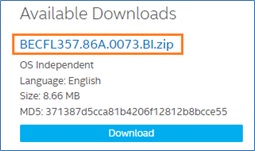
Pobierz plik aktualizacji BIOSu iFlash (*.BI.zip). Przykład:
- Podwójnie kliknij plik *BI.zip , aby wyodrębnić jego pliki.
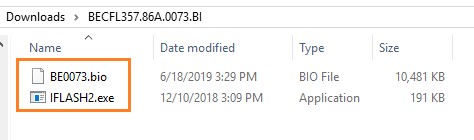
- Skopiuj plik IFLASH2.exe oraz plik .bio na urządzenie USB z możliwością uruchamiania.
- Skonfiguruj BIOS komputera docelowego w celu uruchamiania z urządzenia USB:
- Naciśnij F2 podczas uruchamiania, aby wejść do konfiguracji BIOSu.
- Przejdź do menu Boot.
- Włącz USB Boot.
- Naciśnij F10 aby zapisać i wyjść z ustawień BIOS.
- Uruchom docelowy komputer z podłączonym urządzeniem USB.
- W oknie poleceń wpisz IFLASH2 /PF XXX.bio, gdzie XXX.bio to nazwa pliku .bio i naciśnij Enter.
- Postępuj zgodnie z instrukcjami.
Jeśli napotkasz jakiekolwiek problemy, skontaktuj się z Wsparciem technicznym.
- Above information might be partly or entirely quoted from exterior websites or sources. please refer to the information based on the source that we noted. Please directly contact or inquire the sources if there is any further question and note that ASUS is neither relevant nor responsible for its content/service
- This information may not suitable for all the products from the same category/series. Some of the screen shots and operations could be different from the software versions.
- ASUS provides the above information for reference only. If you have any questions about the content, please contact the above product vendor directly. Please note that ASUS is not responsible for the content or service provided by the above product vendor.