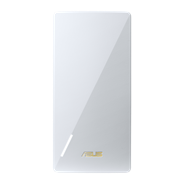
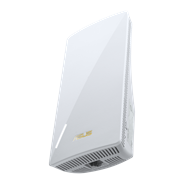
Repetor / Punct de Acces / Punte Media Dual-Band Wireless-N300
  • Antenele externe amplifică acoperirea și intensitatea semnalului Wi-Fi
  • Proces de setare rapid și sigur printr-o simplă apăsare a butonului WPS
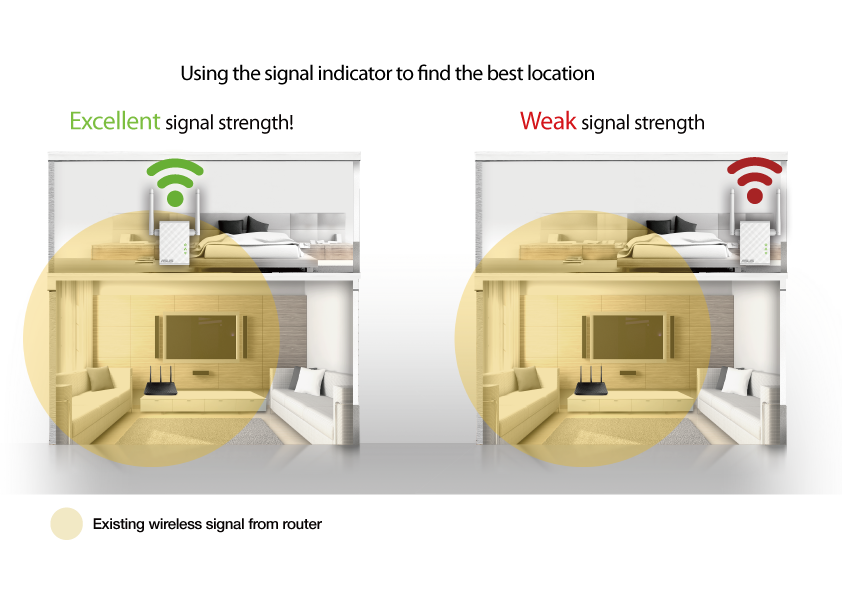
  • Indicatorul LED inteligent pentru intensitatea acoperirii de semnal te ajută să identifici locația ideală pentru a optimiza performanțele rețelei Wi-Fi
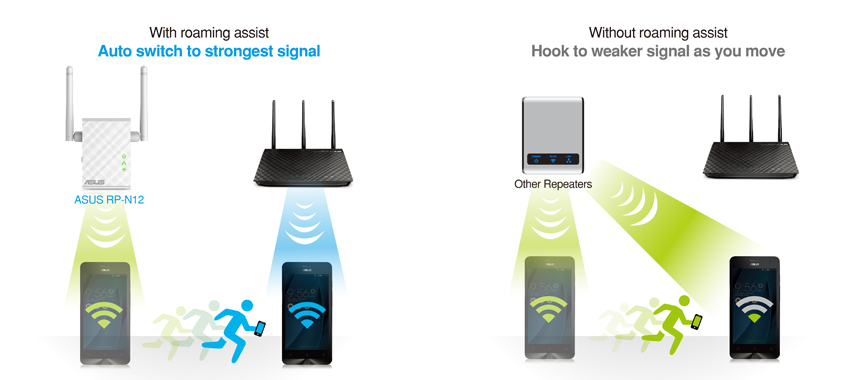
  • Roaming Assist te ajută să beneficiezi de o conexiune stabilă oriunde, acasă sau la birou
RP-N12

Fill Your Home with Wi-Fi

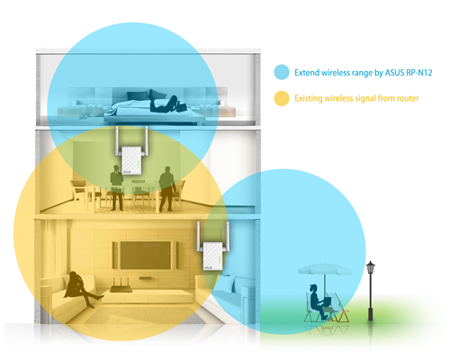
The RP-N12 wireless range extender has powerful external MIMO antennas that help to eliminate signal dead zones and improve the coverage of any existing wireless router. It works as a range extender, which means it can extend wireless networking to every corner of the home — even to those difficult, hard-to-reach spots. This ensures reliable high-speed internet coverage everywhere for devices such as notebooks, tablets, smartphones, game consoles and smart TVs.


One-press setup and worry-free connectivity

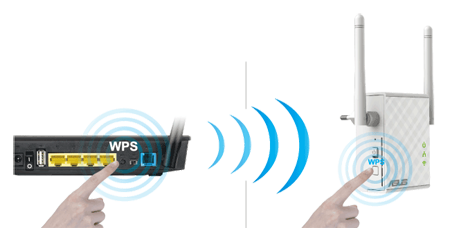
RP-N12 wireless range extender installation doesn’t require a CD or even a mouse and keyboard. Simply press the WPS button and setup is complete. Optimized performance is assured for a seamless and smooth internet experience. For advanced settings, you can connect RP-N12 to a PC via an Ethernet cable and access the web-based configuration menu directly, with no disc or app needed. You can even set it up wirelessly from a tablet or smartphone.


Find the best location for RP-N12 with the signal indicator

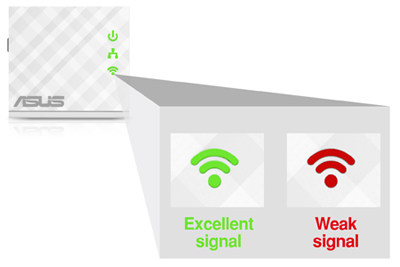
For best results, RP-N12 needs to be within range of a stable router signal, and should be placed between the router and the location where you need better wireless coverage. RP-N12 works best when it is receiving a strong wireless signal from the router — you can check this by using the signal strength indicator on the front panel.


3-in-1 repeater, access point and media bridge modes

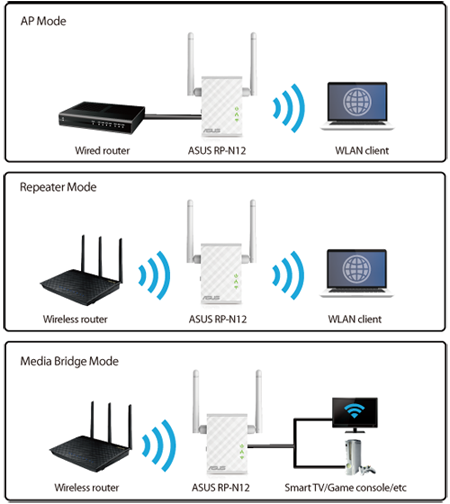
RP-N12 has two more convenient modes to make it even more flexible. As well as a repeater, it can also work as a wireless access point (AP) or as a media bridge. In AP mode, it can be connected to any wired LAN — for example, a hotel’s internet connection — to create a personal Wi-Fi hotspot, allowing the internet connection to be accessed from laptops, phones or other Wi-Fi devices. In media bridge mode, it can be connected to any Ethernet-compatible device — such as a smart TV, multimedia player, game console or PC — to give it Wi-Fi capability. A great way to reduce cable mess!


Roaming Assist for stable connections, everywhere!

With our hassle-free Roaming Assist technology, you never have to switch connections manually between RP-N12 and your ASUS router as you move around the home. Once you enable this function, your device will connect automatically to the strongest Wi-Fi signal, whether it’s from the router or the repeater. This ensures that you always get a reliable connection wherever you are in the house1.

Keep Up to Date!

Remember to always keep your device’s firmware up to date so you can benefit from the very latest service and security enhancements — and get exciting new features! Learn more about updating new firmware.


Disclaimer: 1. The effectiveness of the Roaming Assist function varies according to environmental factors. This ASUS-exclusive function works only with ASUS routers.

Produse similare
previous image
next image
  • Produsele certificate de către Comisia Federală a Comunicațiilor și Industriilor Canada vor fi distribuite în Statele Unite și Canada. Vă rugăm vizitați site-urile ASUS USA și ASUS Canada pentru mai multe informații referitoare la produsele disponibile local.
  • Toate specificațiile pot fi supuse modificărilor fără un anunț prealabil. Vă rugăm să verificați la dealer-ul dvs. pentru o ofertă exactă. Produsele pot să nu fie disponibile pe toate piețele.
  • Specificatiile si configuratia pot varia in functie de model, imaginile au caracter ilustrativ. Va rugam vizitati pagina cu specificatiile complete.
  • Culoarea PCB-ului și software-ul bundle pot suferi modificări fără un anunț prealabil.
  • Brand-urile și numele produselor menționate sunt mărci înregistrate ale companiilor respective.
  • Termenii HDMI și HDMI High-Definition Multimedia Interface, imaginea comercială HDMI şi siglele HDMI sunt mărci comerciale sau mărci comerciale înregistrate ale HDMI Licensing Administrator, Inc. în Statele Unite şi în alte ţări.

  • The actual transfer speed of USB 3.0, 3.1, 3.2, and/or Type-C will vary depending on many factors including the processing speed of the host device, file attributes and other factors related to system configuration and your operating environment.
  • Actual data throughput and WiFi coverage will vary from network conditions and environmental factors, including the volume of network traffic, building material and construction, and network overhead, result in lower actual data throughput and wireless coverage.
  • Quoted network speeds and bandwidth based on current IEEE 802.11ac specifications. Actual performance may be affected by network and service provider factors, interface type, and other conditions. Connected devices must be 802.11ac-compatible for best results.