


RT-N12HP
High Power N300 3-in-1 Wi-Fi Router / Access Point / Repeater
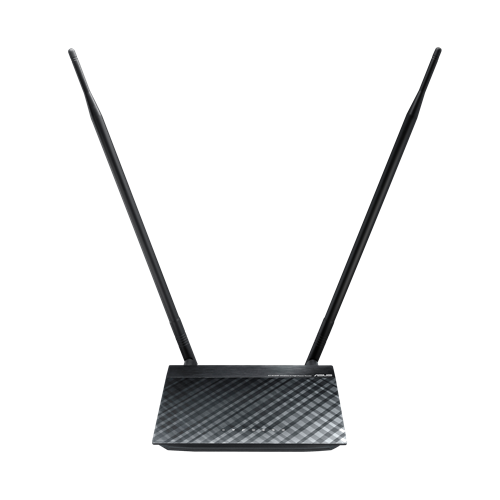
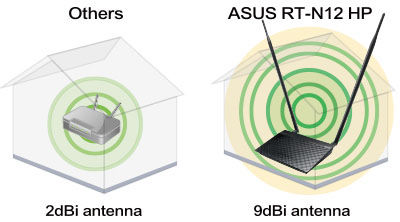
- WiFi เราเตอร์ 802.11n มาพร้อมกับเสาอากาศ 9 dBi 2 ต้นที่สามารถถอดเปลี่ยนได้ สามารถปรับกำลังส่งสัญญาณเพื่อเพิ่มระยะครอบคลุมสัญญาณกว่า 2 เท่า
- หน้าจอการตั้งค่า ASUSWRT ให้คุณตั้งค่า ตรวจสอบและควบคุมเราเตอร์ได้อย่างง่ายดาย
- ฟังก์ชั่น Parental Control ให้คุณกำหนดเวลาการใช้งานอินเตอร์เน็ตสำหรับอุปกรณ์ที่ต้องการ
- รองรับการรับ-ส่งข้อมูลออนไลน์จำนวนมากด้วยจำนวนดาต้าเซสชั่นมากถึง 300,000 เซสชั่น
เปรียบเทียบ



- คุณสมบัติอาจมีการเปลี่ยนแปลง โดยมิจำเป็นต้องแจ้งให้ทราบล่วงหน้า กรุณาสอบถามได้ที่ตัวแทนจำหน่าย ผลิตภัณฑ์ในบางรุ่น อาจไม่มีจำหน่ายในประเทศไทย
- สเปคและคุณสมบัติอาจแตกต่างจากที่ระบุ และรูปภาพใช้ในการโฆษณาเท่านั้น กรุณาตรวจสอบ ณ จุดวางจำหน่ายก่อนสั่งซื้อ
- สีของ PCB และซอฟต์แวร์ที่แถมอาจมีการเปลี่ยนแปลง โดยมิแจ้งให้ทราบล่วงหน้า
- ในกรณีที่ ต้องการนำคุณสมบัติเพื่อยื่นซองประมูล กรุณาติดต่อเพื่อรับเอกสารจากตัวแทนจำหน่ายเท่านั้น เนื่องจากคุณสมบัติบนเว็บไซต์อาจมีการเปลี่ยนแปลงอยู่ตลอดเวลา
- เครื่องหมายการค้า และ ผลิตภัณฑ์ เป็นลิขสิทธิ์ของบริษัทฯ
- การตัดสินของเอซุส ถือเป็นที่สิ้นสุด
- ผลิตภัณฑ์ที่รับรองโดย Federal Communications Commission และ Industry Canada จะจัดจำหน่ายในสหรัฐอเมริกาและแคนาดา โปรดเยี่ยมชมเว็บไซต์ ASUS USA และ ASUS Canada เพื่อดูข้อมูลเกี่ยวกับผลิตภัณฑ์ที่มีจำหน่ายในท้องถิ่น
- คำว่า HDMI และ HDMI High-Definition Multimedia Interface รวมทั้งโลโก้ HDMI เป็นเครื่องหมายการค้าหรือเครื่องหมายการค้าจดทะเบียนของ HDMI Licensing Administrator, Inc. ในประเทศสหรัฐอเมริกาและประเทศอื่นๆ
- The actual transfer speed of USB 3.0, 3.1, 3.2, and/or Type-C will vary depending on many factors including the processing speed of the host device, file attributes and other factors related to system configuration and your operating environment.
- Actual data throughput and WiFi coverage will vary from network conditions and environmental factors, including the volume of network traffic, building material and construction, and network overhead, result in lower actual data throughput and wireless coverage.
- Quoted network speeds and bandwidth based on current IEEE 802.11ac specifications. Actual performance may be affected by network and service provider factors, interface type, and other conditions. Connected devices must be 802.11ac-compatible for best results.