


- Ağ kablosuna ihtiyaç yok: sağlam ve sorunsuz ağ için elektrik hattını kullanan tak-çalıştır ağ.
- İki sorunu aynı anda çözün: Hızlı, kararlı 500 Mbps HomePlug® AV bağlantısı ile güçlü 300 Mbps 802.11n Kablosuz erişim noktası.
- Kolay kurulum: Tak çalıştır kurulum ile kolay Kablosuz ağ klonlama.
- Güçlü güvenlik: Şifrelenmiş eşleştirme, izin verilmeyen cihazları engeller.
- Esnek bağlantı seçenekleri: Elektrik hattı, iki Ethernet LAN girişi ya da Kablosuz\^dla birden fazla cihaz bağlayın.
- Bekleme modu: %80 oranında güç tasarrufu için kullanılmadığı zaman otomatik olarak uyku moduna geçer.
- Kesintisiz Kablosuz: Roaming Assist, sizi otomatik olarak en güçlü Kablosuz sinyaline bağlar.
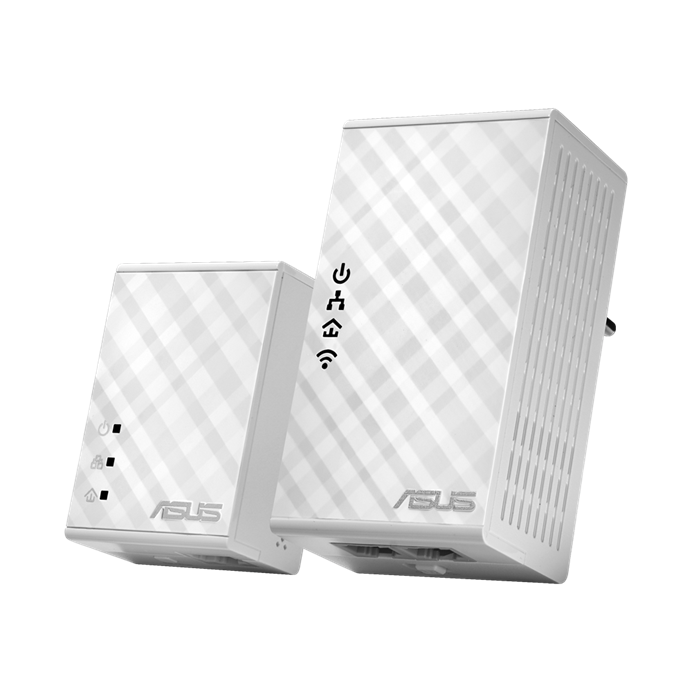
Get Wi-Fi from any power socket!
The
ASUS PL-N12 Kit instantly extends your wired and wireless network to hard-to-reach areas of
your home. It uses high-speed HomePlug® AV powerline technology to make a connection — over existing mains wiring — between your router and a Wi-Fi access point that you can plug into any mains socket. This gives you a convenient, stable 300Mbps Wi-Fi signal anywhere, without physical clutter!
With two Ethernet LAN ports on the Wi-Fi access point, you can also use PL-N12 Kit to connect to any wired network devices, such as desktop PCs, games consoles or smart TVs. PL-N12 Kit is amazingly easy to set up: just
plug the adapters in and press a button to create an encrypted network connection between them.
Setting up Wi-Fi is just as easy, with a one-click clone feature that does away with the need for entering network names or passwords. It really is that simple! Clever noise filtering technology prevents performance being affected by electrical interference, and Roaming Assist keeps you connected to the best Wi-Fi signal as you move around the house.
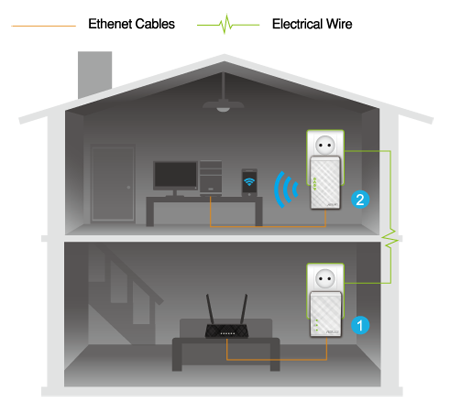
300 Mbps Wi-Fi plus great connectivity
Even though it’s compact and convenient, PL-N12 Kit has full networking capabilities. Your mains sockets become 300 Mbps Wi-Fi nodes, while the two Ethernet LAN ports can be used to connect PCs, games consoles, smart TVs or any other wired network device!
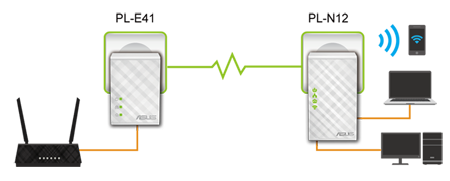
Instant plug-and-play setup!
Setting up PL-N12 Kit is incredibly easy! Simply plug it in and you can enjoy the internet via Ethernet cables or Wi-Fi.
Step1:
Connect the smaller adapter to your router with a network cable, then plug it into a power outlet.
Step2:
Plug the larger (Wi-Fi) adapter into any power outlet, then connect your devices via Wi-Fi or the network ports on the adapter — and that’s it!
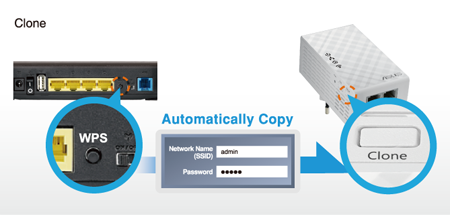
Automatically copy your existing Wi-Fi network details from the router to PL-N12 Kit with a single touch!
One-touch Wi-Fi setup
With PL-N12 Kit you don’t have to enter complicated wireless network names or passwords! Just press the Clone button on the Wi-Fi adapter and the WPS button on your router, wait a few moments, and that’s it! Once it’s done you can place the Wi-Fi adapter anywhere to enjoy seamless networking across your entire home or office — there’s no need to configure the adapter again!
One-touch security
To create an encrypted powerline connection, just press the Pair buttons on both adapters. This sets up an encrypted connection between the adapters, and prevents anyone connecting an unauthorized adapter to your powerline network (you can always add your own adapters, of course!). This is perfect if you live somewhere with shared mains wiring, such as an apartment — your neighbors won’t be able to accidentally connect to your network.
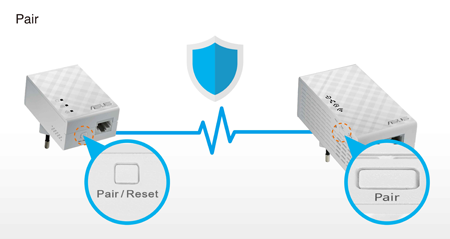
Keep your powerline network encrypted and safe by pressing the ‘Pair’ buttons!

Power-saving standby
Unlike traditional adapters that are always fully powered, PL-N12 Kit has a clever standby mode that detects whether connected devices have been switched off or are inactive. If that happens, PL-N12 goes into a low-power mode that reduces power consumption by 80%1 . This helps you save money on power bills, and is also kinder to the environment.

Noise Filter
Some powerline adapters can be affected by electrical interference from household appliances. PL-N12 Kit uses clever noise filtering technology to prevent any chance of this happening, ensuring smooth and stable performance.

Roaming Assist for stable connections
Roaming Assist is a technology used in PL-N12 Kit and ASUS routers. It keeps you connected to the best Wi-Fi signal as you move around the house, so you don’t have to keep connecting and disconnecting manually to different Wi-Fi signals.2
Keep Up to Date!
Remember to always keep your device’s firmware up to date so you can benefit from the very latest service and security enhancements — and get exciting new features! Learn more about updating new firmware.
Note:
1. The actual data may vary as a result of
network conditions and environmental factors.
2. The effectiveness of the Roaming Assist function varies
according to environmental factors. This ASUS-exclusive function works only
with ASUS routers.


- Federal İletişim Komisyonu ve Industry Canada tarafından onaylanan ürünler Amerika Birleşik Devletleri ve Kanada'da dağıtılacaktır. Yerel olan mevcut ürünler hakkında bilgi için lütfen ASUS ABD ve ASUS Kanada web sitelerini ziyaret edin.
- Tüm özellikler önceden haber verilmeksizin değiştirilebilir. Kesin teklifler için lütfen tedarikçinize danışın. Ürünler tüm pazarlarda bulunmayabilir.
- Teknik özellikler modele göre değişkenlik gösterebilir, görseller temsilidir. Lütfen tüm ayrıntılar için özellikler sayfalarına bakın.
- PCB rengi ve birlikte verilen yazılım sürümleri önceden haber verilmeksizin değiştirilebilir.
- Belirtilen marka ve ürün adları, ilgili şirketlerin ticari markalarıdır.
- HDMI, HDMI High-Definition Multimedia Interface terimleri ve HDMI logosu, Amerika Birleşik Devletleri ve diğer ülkelerde, HDMI Lisanslama Yöneticisinin ticari veya tescilli ticari markalarıdır.
- The actual transfer speed of USB 3.0, 3.1, 3.2, and/or Type-C will vary depending on many factors including the processing speed of the host device, file attributes and other factors related to system configuration and your operating environment.
- Actual data throughput and WiFi coverage will vary from network conditions and environmental factors, including the volume of network traffic, building material and construction, and network overhead, result in lower actual data throughput and wireless coverage.
- Quoted network speeds and bandwidth based on current IEEE 802.11ac specifications. Actual performance may be affected by network and service provider factors, interface type, and other conditions. Connected devices must be 802.11ac-compatible for best results.