[Solução de problemas] Problemas de WiFi e Bluetooth em produtos NUC

Se você estiver enfrentando problemas relacionados ao WiFi ou Bluetooth no seu NUC, consulte a tabela abaixo para obter dicas de solução de problemas e informações úteis.

NotaRecomendamos que você atualize a versão do BIOS, o driver sem fio e o driver Bluetooth como primeiro passo para resolver problemas de conexão sem fio ou Bluetooth. O BIOS e os drivers estão disponíveis no Centro de Download.
Problema ou perguntaComo resolver
Sem conectividade sem fio

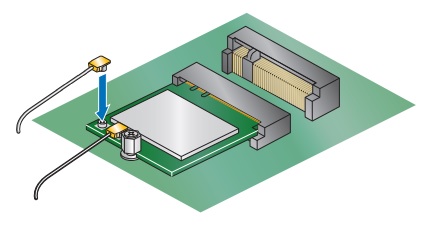
Abra a caixa do Intel NUC e verifique se as conexões de antena do componente sem fio estão seguras.

Antena

Conectividade sem fio intermitente
  • Mantenha o Intel NUC e outros dispositivos eletrônicos separados. A interferência pode ocorrer se dispositivos como CD/DVD e drives Blu-ray Disc™ estiverem muito próximos do Intel NUC. Dispositivos que transmitem ondas eletromagnéticas fortes, como microondas, monitores de bebê e telefones sem fio, também podem interferir nos sinais sem fio.
  • Se você estiver conectando a uma banda de frequência de 5GHz, tente mudar para 2,4GHz, se possível.
Não é possível ativar o Intel NUC usando mouse ou teclado BluetoothO despertar por Bluetooth não é suportado em todos os modelos de Intel NUC. Consulte a seção Dispositivos e Eventos de Despertar da Mantenha a Tag html e o tradutor para Português (Brasil)
Contatar Suporte
Entre em contato conosco se as informações acima não resolverem o seu problema
  • Above information might be partly or entirely quoted from exterior websites or sources. please refer to the information based on the source that we noted. Please directly contact or inquire the sources if there is any further question and note that ASUS is neither relevant nor responsible for its content/service
  • This information may not suitable for all the products from the same category/series. Some of the screen shots and operations could be different from the software versions.
  • ASUS provides the above information for reference only. If you have any questions about the content, please contact the above product vendor directly. Please note that ASUS is not responsible for the content or service provided by the above product vendor.