[Wireless / Networking] How do I confirm whether the product lifecycle has ended (EOL)?
Product lifecycle (EOL, End of life) is part of ASUS's ongoing commitment to excellence and product line optimization. If you are not sure whether your product has reached EOL, or want to find a more suitable alternative for a discontinued model, this article can help you find a solution.
1. What does end of product lifecycle (EOL) mean?
End of life (EOL) means the product has reached the end of its support cycle, and ASUS will no longer provide the following services:
| Item | Post-EOL Status |
| Production and Sales | Discontinue production and remove from official channels |
| Firmware and Security Update | Stop providing Firmware and Security Update (including security vulnerability fixes). After updates are stopped, product functionality may be affected, for example, it may only connect to the local network, some functions may become unavailable, or it may stop working completely (see items 3 and 4 for details) |
| Certifications (e.g., EMC and radio) | Updates and maintenance discontinued |
| Technical documentation (User Manual, Quick Start Guide, official web page) | No longer updated |
| Technical Support | Limited consultation only, excluding troubleshooting of functional or security issues |
Announcement Method:
ASUS will post an announcement on the official EOL product list page before a product is added to the EOL list, and recommends that users who have registered the product plan their upgrade early.
2. How do I query products that have reached EOL?
Please refer to the link below to check products that have reached end of life. We will continue to update the product list.
URL : End-of-life product list (asus.com)
Product EOL schedule : ASUS networking products will continue to receive product maintenance for a certain period after the last sale date. During this period, firmware and security update support will continue to be provided. Lifecycle schedules may vary by product category depending on product positioning or region. For the actual EOL date, refer to the time announced on the EOL list page for each product.
3. How will my product’s software functionality be affected after the product reaches EOL?
Once the product reaches EOL, its software and firmware will no longer receive technical support or updates. The specific impacts are as follows:
- Feature maintenance and updates discontinued: ASUS will no longer provide any system feature updates, performance optimizations, new feature development, or software bug fixes for this product.
- Cloud and App integration services may be limited: If the product includes cloud services, remote access, or control features through a dedicated App (such as iOS/Android), we cannot guarantee that EOL products will maintain normal connectivity or full functionality over the long term as mobile operating systems and cloud architectures evolve.
- Third-party service and protocol compatibility failure: Third-party services, packages, or network protocols integrated into the product (for example: browser certificates, Third-party Cloud API, DDNS, VPN protocols, etc.) may, due to Third-party system upgrades or security policy changes, cause some product functions to stop working. ASUS will be unable to provide fixes or revised versions for such changes.
- Technical support discontinued: Official customer service and the Technical Support team will no longer provide software operation assistance, troubleshooting, or setup help for this product, and related technical documents may also stop being updated.
Suggested action: To ensure you can enjoy the latest software features, stable cloud connection quality, and the best network security protection, we suggest you upgrade and replace your device with a new model currently recommended by ASUS. Please refer to the EOL product list page above to make your selection.
4. How will my network security be affected after the product reaches EOL?
Once the product reaches End of Life (EOL), it will no longer receive any firmware Update, including important Security Update Notification. This means:
- If new security vulnerabilities are discovered in the future, this product may not receive patches and may remain exposed to known or unknown attack risks.
- Products that have stopped receiving updates are more likely to be scanned or compromised by hackers, or used as an entry point to attack other devices in your home and steal personal data.
- The product’s security features, such as encryption and authentication mechanisms, will no longer be updated as technology evolves, and its protection capabilities will gradually fall behind new types of network threats over time.
If you choose to continue using this product after EOL, you acknowledge that you have understood and accepted the above risks.
5. What are my options if a product has reached EOL?
If the product you want to buy has reached EOL, we suggest you refer to the link below to find a model with similar features or buy an officially recommended replacement model : End-of-life product list (asus.com)
In addition, if you want to strengthen the protection of your current Home Network before you Upgrade, ASUS has partnered with McAfee to launch the ASUS Secure Go endpoint protection Service, offering Real-Time protection and features such as VPN. For details, please refer to: ASUS Secure Go powered by McAfee
6. How should I properly dispose of an EOL product?
To prevent Personal Data leaks or unauthorized access to the device, we recommend following the steps below before you decommission or dispose of an EOL product:
- Disable Remote Management/cloud connection: If remote access, ASUS Router App, or cloud service connection was previously enabled, disable it first to prevent the device from still being externally accessible after it is removed.
- Restore the device to factory settings: Use the device management interface or physical button to restore the product to its factory default settings, clearing your WiFi password, account credentials, and personalized settings.
- Remove Product Registration/Account Binding: If this product was previously bound to an ASUS Account or registered for warranty, please sign in to the relevant system to unbind it and avoid associating account information with a retired device.
- Confirm that personal data has been cleared: including connection history, parental control settings, VPN credentials, and more. We recommend confirming again whether restoring factory settings has completely cleared all related data.
- Recycle e-waste according to local regulations: Please dispose of it through qualified e-waste recycling channels and do not throw it away with general trash.
Notes:
- Even after the product reaches EOL, ASUS will continue to provide warranty service within the hardware warranty period in accordance with the warranty policy.
- End of life products and models may vary by region. If you have any questions, please contact your local ASUS customer support for the most suitable solution.
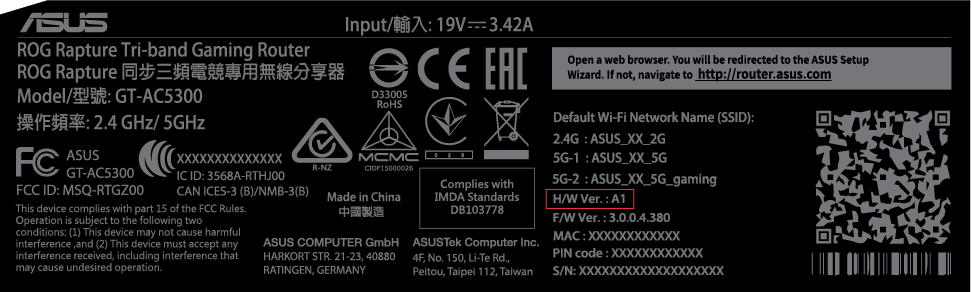
- You can find hardware version information on the product label or box label.