[NUC] Options de configuration d'affichage multiple pour les kits NUC NUC8v7PN, NUC8v5PN et NUC8i3PN
Ce guide fournit les options de configuration d'affichage multiple les plus courantes.
Les kits NUC NUC8v7PN, NUC8v5PN, NUC8i3PN ont les éléments suivants :
- Deux ports HDMI (compatibles 2.0b)
- Un port Type C
Important ! Il n'est pas possible d'utiliser le port "HDMI 2" ET le port Type C pour l'affichage en même temps.
Consultez la section Sous-système graphique du processeur du document Spécification technique du produit pour votre Intel NUC pour obtenir des informations supplémentaires, notamment :
- Chaînage en cascade de transport multi-flux
- DisplayPort via Type C
Avant de commencer
Nous vous recommandons de mettre à jour d'abord votre Intel NUC avec le dernier BIOS et le dernier pilote HD Graphics, en utilisant Driver & Support Assistant.
Deux affichages

| Affichage | Port Intel NUC | Port TV/moniteur | Résolution maximale prise en charge |
| 1 | HDMI | HDMI | 4096x2160 à 60 Hz |
| 2 | HDMI | HDMI | 4096x2160 à 60 Hz |
Ou
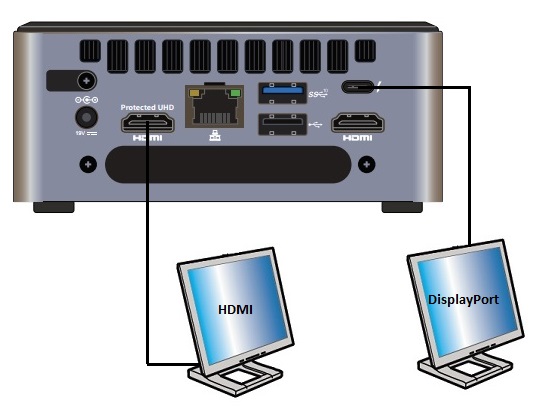
| Affichage | Port Intel NUC | Port TV/moniteur | Résolution maximale prise en charge |
| 1 | HDMI | HDMI | 4096x2160 à 60Hz |
| 2 | Type C | DisplayPort | 4096x2160 à 60Hz |
Trois écrans
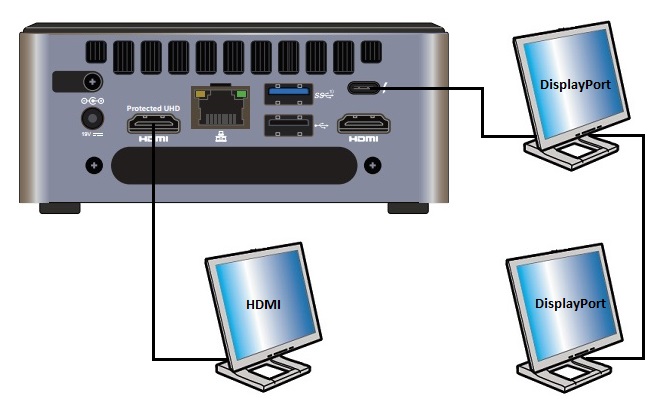
| Affichage | Port Intel NUC | Port TV/moniteur | Résolution maximale prise en charge |
| 1 | HDMI | HDMI | 4096x2160 à 60Hz |
| 2 | Type C | DisplayPort | 4096x2160 à 60Hz |
| 3 | N/A | Chaîne en série : du port DisplayPort OUT du premier moniteur au port DisplayPort IN du deuxième moniteur | 4096x2160 à 60Hz |
Ou
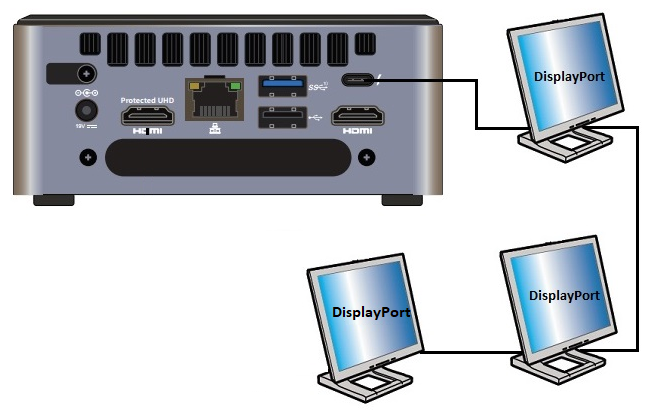
| Afficher | Port Intel NUC | Port TV/moniteur | Résolution maximale prise en charge |
| 1 | Type C | DisplayPort ou Type C | 4096x2160 à 60 Hz |
| 2 | N/A | En chaîne : à partir de DisplayPort OUT sur le premier moniteur vers DisplayPort IN sur le deuxième moniteur | 4096x2160 à 60 Hz |
| 3 | N/A | En chaîne : à partir de DisplayPort OUT sur le deuxième moniteur vers DisplayPort IN sur le troisième moniteur | 4096x2160 à 60 Hz |
La mise en chaîne (daisy-chaining) désigne la capacité de connecter plusieurs écrans en utilisant une seule connexion entre chacun d'eux. Tous les écrans et tous les câbles doivent prendre en charge la spécification DisplayPort 1.2.
- Above information might be partly or entirely quoted from exterior websites or sources. please refer to the information based on the source that we noted. Please directly contact or inquire the sources if there is any further question and note that ASUS is neither relevant nor responsible for its content/service
- This information may not suitable for all the products from the same category/series. Some of the screen shots and operations could be different from the software versions.
- ASUS provides the above information for reference only. If you have any questions about the content, please contact the above product vendor directly. Please note that ASUS is not responsible for the content or service provided by the above product vendor.