[NUC] Comment mettre à jour votre BIOS en utilisant l'utilitaire iFLASH pour les NUC
Résolution
| Note | Pour créer un périphérique USB bootable, consultez l'un des sites Web suivants pour des astuces sur la création de périphériques USB bootable. Intel ne peut pas aider à la création de périphériques bootable. Comment booter à partir d'une clé USB |
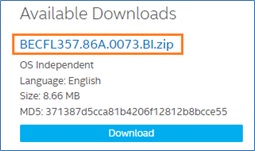
Téléchargez le fichier de mise à jour du BIOS iFlash (*.BI.zip). Exemple :
- Double-cliquez sur le fichier *BI.zip pour extraire ses fichiers.
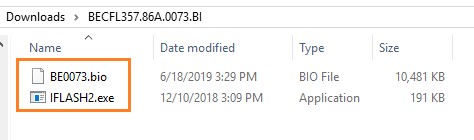
- Copiez le fichier IFLASH2.exe et le fichier .bio sur le périphérique USB bootable.
- Configurez le BIOS de l'ordinateur cible pour démarrer à partir du périphérique USB :
- Appuyez sur la touche F2 pendant le démarrage pour accéder au BIOS.
- Allez dans le menu Démarrage.
- Activer USB Boot.
- Appuyez sur F10 pour enregistrer et quitter le BIOS Setup.
- Démarrer l'ordinateur cible avec le périphérique USB connecté.
- À l'invite, tapez IFLASH2 /PF XXX.bio, où XXX.bio est le nom du fichier .bio et appuyez sur Entrée.
- Suivez toutes les invites.
Si vous rencontrez des problèmes, contactez le support client.
- Above information might be partly or entirely quoted from exterior websites or sources. please refer to the information based on the source that we noted. Please directly contact or inquire the sources if there is any further question and note that ASUS is neither relevant nor responsible for its content/service
- This information may not suitable for all the products from the same category/series. Some of the screen shots and operations could be different from the software versions.
- ASUS provides the above information for reference only. If you have any questions about the content, please contact the above product vendor directly. Please note that ASUS is not responsible for the content or service provided by the above product vendor.