Related Topics
[Chromebook] How to store Chromebook for a long period of time
If you plan to store Chromebook for a long term (e.g. when the school year ends), please refer to the following steps. It can reduce battery discharge to a minimum, prevents constant charge and discharge from reducing the battery life, and keeps the Chromebook in a stable, powered-off state.
- Charge your Chromebooks so that the battery is at around 80% full.
- To slow the discharge rate during storage, do not physically remove the battery from the Chromebook for storage. Instead, take the following steps:
- Connect the device to a charger and turn it on.
Note: For older devices, if the device charges via a USB-C connector, the charger must be plugged into a USB-C port on the same side as the charging light. You can verify this by confirming that there is an orange charging light on the same side as the charger after you've plugged it in. - Put your Chromebook into the battery disconnect state.
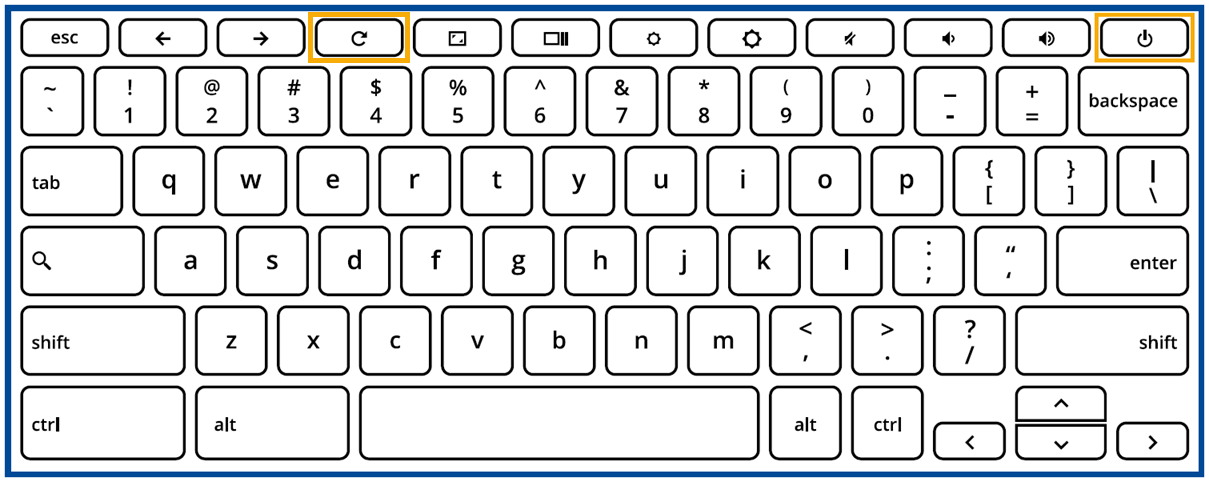
For Chromebooks without a G key on the bottom row of the keyboard:
i. Hold [Refresh] and [Power]
 at the same time.
ii. While holding these keys, remove the power cable from the device and then release the keys.
The device should shut down and remain off.
For Chromebooks with a G key on the bottom row of the keyboard:
i. Hold [Refresh] and tap [Power].
ii. While holding [Refresh], remove the power cable from the device.
The device should shut down and remain off. - 20 seconds after step(b), confirm the battery disconnect worked by pressing [Power].
The device should not power on, despite having a battery charge. The Chromebook won't power on by touching [Power] or opening the lid, until you plug the device back to a power source.
- Connect the device to a charger and turn it on.
This is the ideal way to store devices. It reduces battery discharge to a minimum, prevents constant charge and discharge from reducing the battery life, and keeps the Chromebook in a stable, powered-off state.
Note: If you can’t put your model of Chromebook into the battery disconnect state described above, charge the battery to around 80%. Then, turn off the Chromebook, unplug it from a power source, and store it in a cool, dry place.
How to leave/disable the long-term storage mode?
Connect the Chromebook to a power source so that the device will get out of the "battery disconnection" state. Then, power up your device by pressing the power button.
Above contents are excerpted from Google official website, you also can refer to Google Help Center for more detailed information.