المُنتج
EBR63, GS7, GS-BE12000, GS-BE18000, GS-BE7200X, GT-AC5300, GT-AX11000, GT-AX11000 Pro, GT-AX6000, GT-AXE11000, GT-BE19000, GT-BE19000AI, GT-BE96, GT-BE96 AI, GT-BE98, GT-BE98 Pro, ROG Rapture GT6, ROG Rapture GT-AC2900, ROG Rapture GT-AXE16000, ROG Strix GS7 Air, ROG STRIX GS7 Pro, ROG STRIX GS-AX3000, ROG STRIX GS-AX5400, RP-AX56, RP-AX58, RT-AC2900, RT-AC86U, RT-ACRH18, RT-AX1800, RT-AX3000, RT-AX3000P, RT-AX5400, RT-AX55, RT-AX56U, RT-AX57, RT-AX58U, RT-AX58U V2, RT-AX59U, RT-AX68U, RT-AX82U, RT-AX82U GUNDAM EDITION, RT-AX86S, RT-AX86U, RT-AX86U ZAKU II EDITION, RT-AX88U, RT-AX88U Pro, RT-AX92U, RT-BE14000, RT-BE18000, RT-BE3600, RT-BE3600M HATSUNE MIKU EDITION, RT-BE3600S, RT-BE50, RT-BE55, RT-BE57, RT-BE58U, RT-BE7200, RT-BE86U, RT-BE88U, RT-BE90U, RT-BE92U, RT-BE96U, RT-BE9700, TUF-AX3000, TUF-AX3000 V2, TUF-AX4200, TUF-AX4200Q, TUF-AX5400, TUF-AX5400 V2, TUF-AX6000, TUF-BE3600, TUF-BE6500, TUF-BE9400, TX-AX6000, ZenWiFi AC Mini (CD6), ZenWiFi AXE7800, ZenWiFi BD4, ZenWiFi BD4 Outdoor, ZenWiFi BD5, ZenWiFi BD5 Outdoor, ZenWiFi BE14000, ZenWiFi BE30000, ZenWiFi BE3600, ZenWiFi BE5000, ZenWiFi BQ16, ZenWiFi BQ16 Pro, ZenWiFi BT10, ZenWiFi BT6, ZenWiFi BT8, ZenWiFi ET8, ZenWiFi ET9, ZenWiFi Pro ET12, ZenWIFI Pro XT12, ZenWiFi XD4 Plus, ZenWiFi XD4 Pro, ZenWiFi XD5, ZenWiFi XD6S, ZenWiFi XT9
المواضيع ذات الصلة
[جهاز التوجيه اللاسلكي] إعادة ضبط المصنع الصلبة لجهاز التوجيه من ASUS - الطريقة 2
لتوفير تعليمات أكثر تفصيلًا، يمكنك أيضًا النقر على رابط فيديو ASUS على YouTube أدناه لمعرفة المزيد حول [كيفية إعادة ضبط المصنع الصعب لجهاز التوجيه ASUS]
https://www.youtube.com/watch?v=l1chr1-exVM
1. أطفئ جهاز التوجيه.
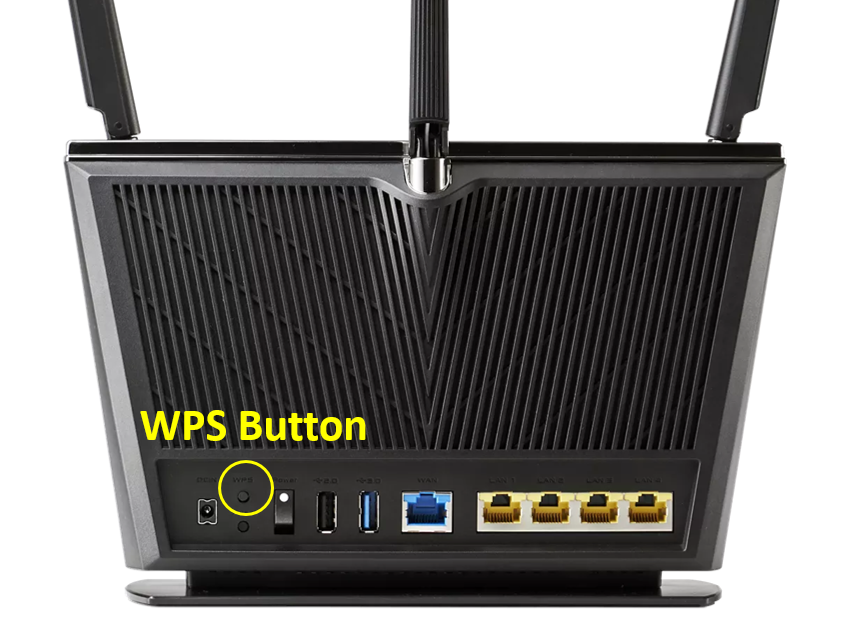
2. اضغط مع الاستمرار على زر WPS وقم بتشغيل جهاز التوجيه.
3. ضوء الطاقة يعمل (استمر في الضغط على زر WPS).
4. حرر زر WPS بعد انطفاء ضوء الطاقة.
5. أعد تشغيل جهاز التوجيه يدويًا بالضغط على زر الطاقة.
ابحث عن زر WPS على جهاز التوجيه الخاص بك، يرجى الرجوع إلى الصورة التالية.
قد يكون هناك اختلافات بسيطة بين الطرازات المختلفة. إذا كان لديك أي سؤال، يرجى التحقق من دليل المستخدم
الصورة التالية توضح [RT-AX68U] كمثال.