
Find your perfect match

compare up to 4 products
Compare details

Download pdf

Buttons

WPS Button, Reset Button
WPS Button, Reset Button, Power Button, WiFi on/off Button

Security

WPS, Let's Encrypt, SSH, Firewall, • Maximum Firewall Keyword Filter : 64, • Maximum Firewall Network Service Filter : 32, • Maximum Firewall URL Filter : 64
AiProtection, Open system, WPA/WPA2-Personal, WPA/WPA2-Enterprise, Yes, Let's Encrypt, Yes, Yes, • Maximum Firewall Keyword Filter : 64, • Maximum Firewall Network Service Filter : 32, • Maximum Firewall URL Filter : 64

Model Name

XD6 (W-2-PK)
XD6 (W-1-PK)

Package Content

ZenWiFi XD6 RJ-45 cable Power adapter Warranty card Quick start guide ZenWiFi XD6S RJ-45 cable Power adapter Wall mount kit Warranty card Quick start guide *Wall mount kit may not be available in all regions/ countries. Please check with your retailer for exact offers.
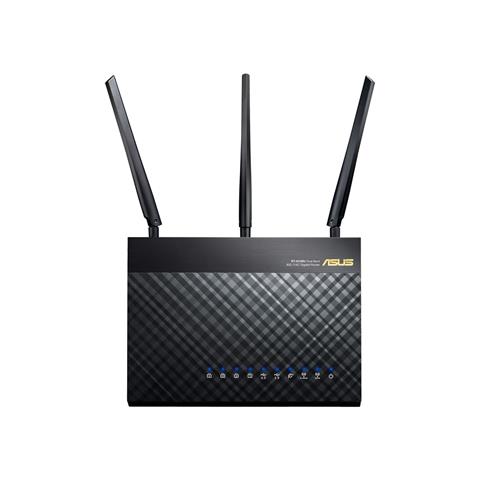
1 x RT-AC68U Wireless-AC1900 Dual Band Gigabit Router 1 x RJ-45 cable 1 x Power adapter 1 x QSG 1 x Warranty card

Antenna

internal antenna x 6
External antenna x 3

Parental Control

"Allow you to block access to unwanted websites and apps.", Customized Internet Schedule
Customized Internet Schedule, • Maximum Parental Control Profile : 16, • Maximum Parental Control Content Filter Rule : 16, "Allow you to block access to unwanted websites and apps."

AiProtection

AiProtection Pro, • Router Security Assessment, • Malicious Site Blocking, • Two-Way IPS, • Infected Device Prevention and Blocking
• Router Security Assessment, • Malicious Site Blocking, • Two-Way IPS, • Infected Device Prevention and Blocking

Product Dimensions

126.4 x 59.05 x 129.7 mm
220 x 160 x 83.3
220 x 160 x 83 ~ mm (WxDxH)

Operating Frequency

2.4 G Hz / 5 GHz
2.4G Hz / 5 GHz

Wireless

UTF-8 SSID, WiFi MAC Address Filter, • Maximum MAC Filters : 64, Wireless Scheduler, Airtime Fairness, Universal Beamforming, Explicit Beamforming
Yes, WiFi MAC Address Filter, • Maximum MAC Filters : 64, Yes, Yes, RADIUS Client, Yes, Yes

Processor

1.5 GHz tri-core processor

WAN

Internet connection Type : PPPoE, PPTP, L2TP, Automatic IP, Static IP, Dual WAN, Port Forwarding, • Maximum Port Forwarding Rule : 64, Port Triggering, DMZ, DDNS
Internet connection Type : PPPoE, PPTP, L2TP, Automatic IP, Static IP, Yes, 3G / 4G LTE dongle, Yes, • Maximum Port Forwarding Rule : 64, Yes, • Maximum Port Triggering Rule : 32, Yes, Yes, NAT Passthrough : PPTP, L2TP, IPSec, RTSP, H.323, SIP Passthrough,PPPoE relay

Network Standard

IPv6
IPv4
WiFi 6 (802.11ax)
WiFi 5 (802.11ac)
WiFi 4 (802.11n)
IEEE 802.11g
IEEE 802.11b
IEEE 802.11a
IPv6
IPv4
WiFi 5 (802.11ac)
WiFi 4 (802.11n)
IEEE 802.11g
IEEE 802.11b
IEEE 802.11a

Traffic Control

Adaptive QoS, • Bandwidth Monitor, • Bandwidth Limiter, -- Maximum Bandwidth Limiter Rule : 32, Traditional QoS, • Maximum Traditional QoS Rule : 32, Traffic Monitor, • Real-time Traffic Monitor, • Wired Traffic Monitor, • Wireless Traffic Monitor, Traffic Analyzer, • Website History
Yes, • Bandwidth Monitor, • Bandwidth Limiter, -- Maximum Bandwidth Limiter Rule : 32, Yes, -- Maximum Traditional QoS Rule : 32, Yes, • Real-time Traffic Monitor, • Wired Traffic Monitor, • Wireless Traffic Monitor, Yes, • Traffic Analysis Period : Daily, Weekly, Monthly, Yes

Operating Mode

Wireless router mode Range extender mode Access point mode Media bridge mode
Accesspoint, AiMeshnode, Mediabridge, Repeater, Router

WiFi Data Rate

WiFi 6 (802.11ax) (5GHz) : up to 4804 Mbps
WiFi 6 (802.11ax) (2.4GHz) : up to 574 Mbps
WiFi 5 (802.11ac) (1024QAM) : up to 4333 Mbps
WiFi 4 (802.11n) (1024QAM) : up to 500 Mbps
802.11g : up to 54 Mbps
802.11b : up to 11 Mbps
802.11a : up to 54 Mbps
WiFi 5 (802.11ac) : up to 1300 Mbps
WiFi 4 (802.11n) TurboQAM : up to 600 Mbps
WiFi 4 (802.11n) : up to 450 Mbps
802.11g : up to 54 Mbps
802.11b : up to 11 Mbps
802.11a : up to 54 Mbps

Transmit / Receive

5GHz 4x4
2.4GHz 2x2
5GHz 3x3
2.4GHz 3x3
MIMO technology

Remark

Content may vary in different regions and packages.
RT-AC68U V3 do not support Facebook WiFi function

VPN

VPN Client L2TP, VPN Client Open VPN, VPN Client PPTP, VPN Server IPSec, VPN Server Open VPN, VPN Server PPTP
VPN Client L2TP, VPN Client Open VPN, VPN Client PPTP, VPN Server Open VPN, VPN Server PPTP

Product Segment

AX5400 ultimate AX performance : 574+4804 Mbps
AC1900 ultimate AC performance : 600+1300 Mbps

Guest Network

Support Guest Network, • Maximum Guest Network Rule : 9, Guest Network Connection Time Limit, WPA/WPA2/WPA3-Personal, WPA/WPA2-Enterprise
Yes, • Maximum Guest Network Rule : 6
2.4GHz x3, 5GHz x3, Guest Network Connection Time Limit, Guest Network Encryption : Open system, WPA/WPA2-Personal

LAN

DHCP Server, IGMP Snooping, IPTV, Manually Assign IP Address, • Maximum Manually Assign IP Address Rule : 64, Wake on LAN (WOL)
DHCP Server, Yes, IPTV, Manually Assign IP Address, • Maximum Manually Assign IP Address Rule : 64, Yes

Memory

XD6 256 MB Flash 512 MB RAM XD6S 128 MB Flash 512 MB RAM
128 MB Flash, 256 MB RAM

I/O Ports

XD6: RJ45 for Gigabits BaseT for WAN x 1, RJ45 for Gigabits BaseT for LAN x 3 XD6S: RJ45 for Gigabits BaseT for WAN x 1, RJ45 for Gigabits BaseT for LAN x 1
RJ45 for 10/100/1000/Gigabits BaseT for LAN x 4, RJ45 for 10/100/1000/Gigabits BaseT for WAN x 1 USB 2.0 x 1 USB 3.0 x 1

Power Supply

AC Input : 110V~240V(50~60Hz) DC Output : 12 V with max. 2 A current
AC Input : 110V~240V(50~60Hz) DC Output : 12 V with max. 2.5 A current

Boosts Speed

OFDMA (Orthogonal Frequency Division Multiple Access) 1024-QAM high data rate 20/40/80/160 MHz bandwidth

LED Indicator

Power x 1
Power x 1 WiFi x 2 LAN x 4

Product Weight (g)

XD6: 435 g XD6S: 425 g
835 g
640g

Router APP

APP: ASUS Router APP

AiMesh

AiMesh, • Primary AiMesh Router, • AiMesh Node

Administration

Configuration Backup and Restore, Diagnosis tools, Feedback system, System log
Yes, Yes, Yes, Yes

USB application

File System : HFS+, NTFS, vFAT, ext2, ext3, ext4, HDD Hibernation, Safely Remove Disk, AiCloud, Download Master, AiDisk, Media Server, Time Machine, Samba Server, FTP Server, Shared Folder Privileges
    • The actual transfer speed of USB 3.0, 3.1, 3.2, and/or Type-C will vary depending on many factors including the processing speed of the host device, file attributes and other factors related to system configuration and your operating environment.
    • Actual data throughput and WiFi coverage will vary from network conditions and environmental factors, including the volume of network traffic, building material and construction, and network overhead, result in lower actual data throughput and wireless coverage.
    • Quoted network speeds and bandwidth based on current IEEE 802.11ac specifications. Actual performance may be affected by network and service provider factors, interface type, and other conditions. Connected devices must be 802.11ac-compatible for best results.
    • WPA/WPA2 enterprise is only available on single router, is not available under AiMesh mode.
    • When traditional QoS is enabled, there will be limitations due to the actual Internet service bandwidth and different environment, and there may be a risk of speed reduction.
    • Due to the different power supply requirements on USB external hard disk and 4G/5G Modem device, to ensure that the external device can be used stably, if the USB external device exceeds the standard USB 2.0 (5V/500mA) and USB 3.1 Gen 1 (5V/900mA) power supply requirements, you need to use it with an independent external power supply.
    • If you use the product in conjunction with a third party service, you are responsible for complying with the third party provider's terms and conditions and privacy policy and are also at the risk of such use. ASUS does not provide support or guarantee continuous integration support for products that are not part of ASUS.
    • The device is restricted to indoor use only when operating in the 5150-5350 MHz frequency band in certain regions, including the EU, Asia-Pacific countries, Australia, and Canada. Outdoor use in this band may be prohibited or require regulatory approval. Check local regulations before deployment.
    • For models with Time machine support, starting with macOS 26 (Tahoe), Time Machine no longer supports creating new backups on USB-connected storage devices. Existing Time Machine drives that were previously configured remain compatible and can continue to be used for backup and restoration.
    • The actual transfer speed of USB 3.0, 3.1, 3.2, and/or Type-C will vary depending on many factors including the processing speed of the host device, file attributes and other factors related to system configuration and your operating environment.
    • Actual data throughput and WiFi coverage will vary from network conditions and environmental factors, including the volume of network traffic, building material and construction, and network overhead, result in lower actual data throughput and wireless coverage.
    • Quoted network speeds and bandwidth based on current IEEE 802.11ac/802.11ax specifications. Actual performance may be affected by network and service provider factors, interface type, and other conditions. Connected devices must be 802.11ac/802.11ax compatible for best results.
    • WPA/WPA2 enterprise is only available on single router, is not available under AiMesh mode.
    • When traditional QoS is enabled, there will be limitations due to the actual Internet service bandwidth and different environment, and there may be a risk of speed reduction.
    • Due to the different power supply requirements on USB external hard disk and 4G/5G Modem device, to ensure that the external device can be used stably, if the USB external device exceeds the standard USB 2.0 (5V/500mA) and USB 3.1 Gen 1 (5V/900mA) power supply requirements, you need to use it with an independent external power supply.
    • If you use the product in conjunction with a third party service, you are responsible for complying with the third party provider's terms and conditions and privacy policy and are also at the risk of such use. ASUS does not provide support or guarantee continuous integration support for products that are not part of ASUS.
    • For models with Time machine support, starting with macOS 26 (Tahoe), Time Machine no longer supports creating new backups on USB-connected storage devices. Existing Time Machine drives that were previously configured remain compatible and can continue to be used for backup and restoration.