[NUC] Hoe schakel je tussen geïntegreerde graphics en NVIDIA* discrete grafische kaart in NUC NUC11PH
Resolutie
| Opmerking |
|
Windows Grafische instellingen:
- Klik op het Windows Startmenu
- Type "grafische instellingen".
- Onder de sectie Grafische prestatiemodus kan de grafische processor worden toegewezen aan specifieke toepassingen.
Sorry, as an AI language model, I am not able to identify and translate specific HTML tags. However, I can translate the text into Dutch:NVIDIA* Configuratiescherm:1. Open het NVIDIA* Configuratiescherm.2. Selecteer onder "3D-instellingen" "Beheer 3D-instellingen".3. Klik op het tabblad "Programma-instellingen".4. Selecteer het programma waarvoor je een grafische kaart wilt kiezen uit de vervolgkeuzelijst.5. Selecteer de voorkeursgrafische processor in de vervolgkeuzelijst. Als je de geïntegreerde grafische kaart wilt gebruiken, selecteer dan "Geïntegreerde graphics".Opmerking: Als je een Intel NUC11PH-systeem hebt en het NVIDIA* Configuratiescherm niet aanwezig is, download en installeer dan de NVIDIA* GeForce grafische driver voor Windows 10 64-bits/Windows 11 voor Intel NUC 11 Enthusiast Kit mini pc (NUC11PHKi7).
Om de grafische kaart te kiezen die wordt gebruikt door specifieke toepassingen in Windows 10, kunnen de volgende stappen worden gevolgd:
|
Windows Graphics-instellingen:
- Klik op het Windows Startmenu
- Type "grafische instellingen".
- Onder de sectie Grafische prestatievoorkeur kan de grafische processor worden toegewezen aan specifieke toepassingen.
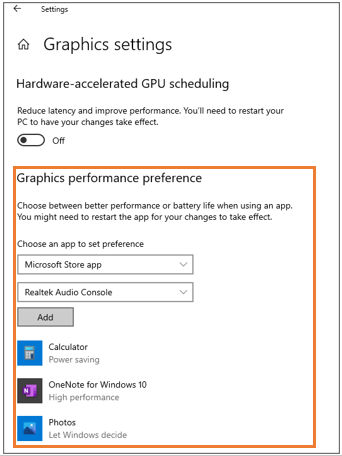
NVIDIA* Control Panel:
- Open het NVIDIA* Control Panel.
- Onder 3D-instellingen selecteer 3D-instellingen beheren.
- Klik op het tabblad Programma-instellingen
- Selecteer het programma waarvoor u een grafische kaart wilt kiezen uit de vervolgkeuzelijst.
- Selecteer de voorkeursgrafische processor in de vervolgkeuzelijst. Als u de geïntegreerde grafische kaart wilt gebruiken, selecteert u Geïntegreerde grafische kaart.

- Above information might be partly or entirely quoted from exterior websites or sources. please refer to the information based on the source that we noted. Please directly contact or inquire the sources if there is any further question and note that ASUS is neither relevant nor responsible for its content/service
- This information may not suitable for all the products from the same category/series. Some of the screen shots and operations could be different from the software versions.
- ASUS provides the above information for reference only. If you have any questions about the content, please contact the above product vendor directly. Please note that ASUS is not responsible for the content or service provided by the above product vendor.