[Bežični ruter] ASUS ruter Hardverski reset na fabričke postavke- Metod 1
Da bismo vam pružili detaljnije uputstvo, možete takođe kliknuti na ASUS Youtube video link ispod da saznate više o tome „Kako izvršiti Hardverski reset na fabričke postavkeASUS rutera“
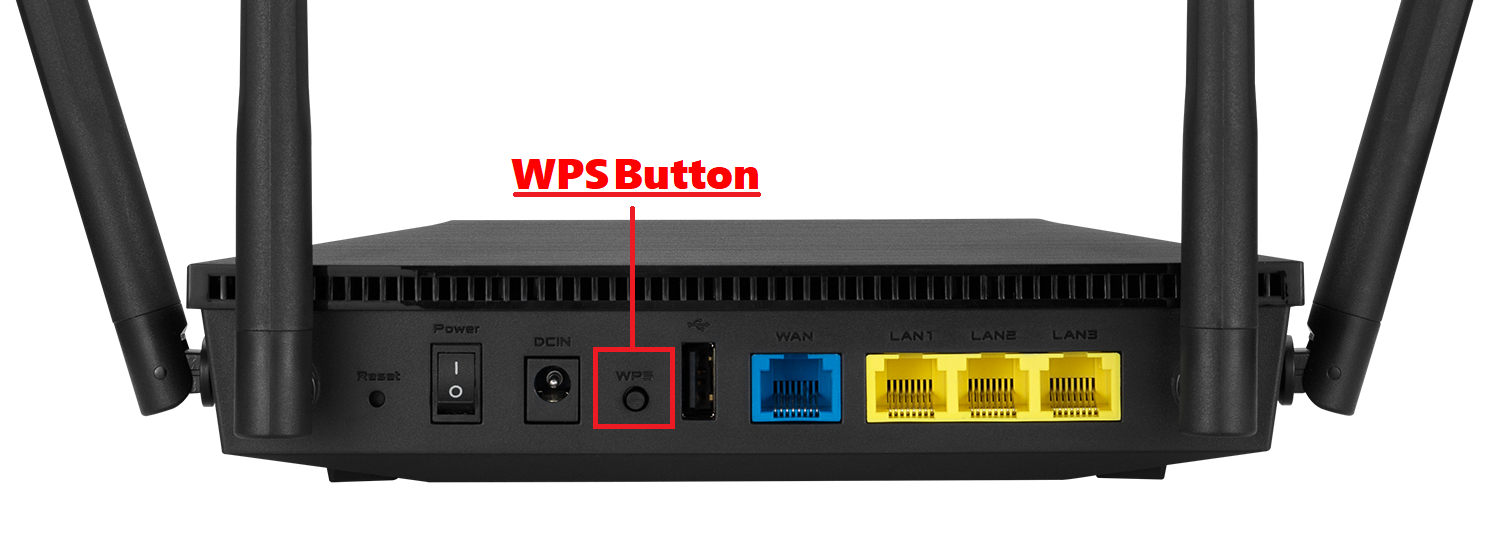
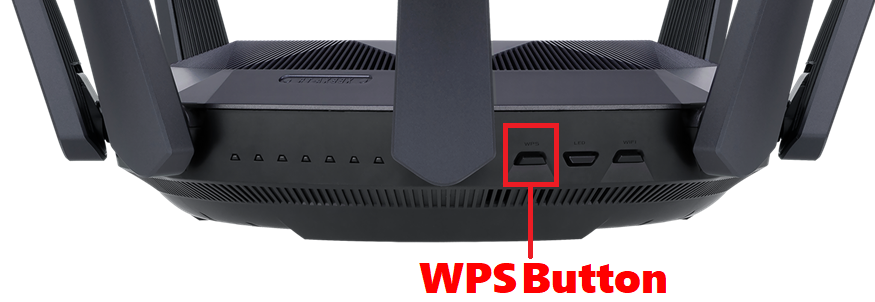
1. Isključite ruter. 2. Pritisnite i držite „WPS“ dugme i uključite ruter. 3. Lampica za napajanje je upaljena(i dalje držite WPS dugme). 4. Otpustite WPS dugme nakon što lampica za napajanje počne da trepće. 5. Kada lampica za napajanje prestane da trepće, ruter će se automatski restartovati.
Pronađite WPS dugme na svom ruteru, pogledajte sledeću sliku.
Ako gornje informacije ne mogu da reše vaš problem, javite nam se
Above information might be partly or entirely quoted from exterior websites or sources. please refer to the information based on the source that we noted. Please directly contact or inquire the sources if there is any further question and note that ASUS is neither relevant nor responsible for its content/service
This information may not suitable for all the products from the same category/series. Some of the screen shots and operations could be different from the software versions.
ASUS provides the above information for reference only. If you have any questions about the content, please contact the above product vendor directly. Please note that ASUS is not responsible for the content or service provided by the above product vendor.