Related Topics
[Notebook] Windows Arm-based PC usage limitations
The following contents are from Microsoft official website, you also can refer to Windows Arm-based PCs FAQ for more details.
Note: How to determine the architecture of your device.
Navigate to Windows Settings > System > About. Here, you can view the architecture of your device under System type. (The image on the left shows an x64 architecture; the image on the right shows an ARM architecture.)

There are some limitations when you run a Windows 11 Arm-based PC:
- Drivers for hardware, games and apps will only work if they're designed for a Windows 11 Arm-based PC. For more info, check with the hardware manufacturer or the organization that developed the driver. Drivers are software programs that communicate with hardware devices—they're commonly used for antivirus and antimalware software, printing or PDF software, assistive technologies, CD and DVD utilities, and virtualization software.
If a driver doesn’t work, the app or hardware that relies on it won’t work either (at least not fully). Peripherals and devices only work if the drivers they depend on are built into Windows 11, or if the hardware developer has released Arm64 drivers for the device.
Note: When using third-party software or hardware (such as printers or other external devices), be sure to install the driver provided by the manufacturer specifically for Arm-based computers. If the driver only supports x86/x64 or does not indicate operating system support, it will not function properly on your Arm-based computer. (The example image below is for reference only)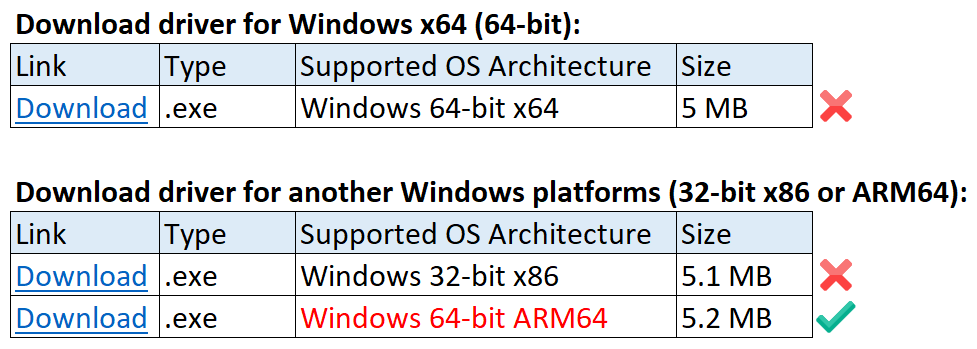
- Certain games won’t work. Games and apps may not work if they rely on "anti-cheat" drivers that haven't been made for Windows 11 Arm-based PCs. Check with your game publisher to see if a game will work or check https://www.worksonwoa.com/ for a crowdsourced view of game compatibility.
- Apps that customize the Windows experience might have problems. This includes some input method editors (IMEs), assistive technologies, and cloud storage apps. The organization that develops the app determines whether their app will work on a Windows 11 Arm-based PC.
- Some third-party antivirus software can’t be installed. You won't be able to install some third-party antivirus software on a Windows 11 Arm-based PC—unless it’s been made or updated for an Arm-based PC. However, Windows Security will help keep you safe for the supported lifetime of your Windows 11 device.
- Windows Fax and Scan isn’t available. This feature isn’t available on a Windows 11 Arm-based PC.
There are some limitations when you run a Windows 10 Arm-based PC:
- Drivers for hardware, games and apps will only work if they're designed for a Windows 10 Arm-based PC. For more info, check with the hardware manufacturer or the organization that developed the driver.
Drivers are software programs that communicate with hardware devices—they're commonly used for antivirus and antimalware software, printing or PDF software, assistive technologies, CD and DVD utilities, and virtualization software.
If a driver doesn’t work, the app or hardware that relies on it won’t work either (at least not fully). Peripherals and devices only work if the drivers they depend on are built into Windows 10, or if the hardware developer has released Arm64 drivers for the device.
Note: When using third-party software or hardware (such as printers or other external devices), be sure to install the driver provided by the manufacturer specifically for Arm-based computers. If the driver only supports x86/x64 or does not indicate operating system support, it will not function properly on your Arm-based computer. (The example image below is for reference only) - 64-bit (x64) apps won’t work. You'll need 64-bit (Arm64) apps, 32-bit (Arm32) apps, or 32-bit (x86) apps. You can usually find 32-bit (x86) versions of apps, but some app developers only offer 64-bit (x64) apps.
- Certain games won’t work. Games and apps won't work if they use a version of OpenGL greater than 1.1, or if they rely on "anti-cheat" drivers that haven't been made for Windows 10 Arm-based PCs. Check with your game publisher to see if a game will work.
- Apps that customize the Windows experience might have problems. This includes some input method editors (IMEs), assistive technologies, and cloud storage apps. The organization that develops the app determines whether their app will work on a Windows 10 Arm-based PC.
- Some third-party antivirus software can’t be installed. You won't be able to install some third-party antivirus software on a Windows 10 Arm-based PC. However, Windows Security will help keep you safe for the supported lifetime of your Windows 10 device.
- Windows Fax and Scan isn’t available. This feature isn’t available on a Windows 10 Arm-based PC.
Question 1: Do devices equipped with Snapdragon processors support internet access via USB tethering from a mobile phone?
Answer 1: No, this is not supported.
Devices powered by Snapdragon processors currently do not support connecting to the internet through USB tethering when sharing a hotspot from an Android or iPhone device.
If mobile internet access is required, we recommend the following alternatives:
- Wi‑Fi hotspot sharing: Enable the mobile hotspot feature on an Android or iPhone and connect via Wi‑Fi.
- Wired or wireless networks: Use a home broadband connection, corporate network, or public Wi‑Fi.
- Mobile network–enabled devices: Connect through a mobile router or other devices that support cellular data connectivity.