Related Topics
- [Lyra][Setup]What is required to set up Lyra?
- [Lyra][Setup] What can I do when I change the segment of primary Lyra and other Lyra devices lost connection with the primary one?
- [Lyra][Setup]Can I manual update firmware for Lyra?
- [Lyra][Setup]What should I do when firmware upgrade fails?
- [Lyra][Setup] How to set up Lyra with Comcast xFinity XB3 cable modem?
- [Lyra][Setup]How to setup Lyra through Web interface?
- [Lyra][Setup]How to reset whole Lyra network?
- [Wireless Router] ASUS router Hard Factory Reset - Method 3
[Lyra][Setup]How to reset single Lyra device?
Reset Lyra through reset button
Press the Reset button until LED shows a flashing orange light then release the Reset button.
The LED color will eventually change from a flashing orange light to various colors. The reset process will be completed when the Lyra device shows a solid white light.
Reset Lyra through Web interface
Make sure your NB/PC is wirelessly connected to Lyra WiFi
Open your browser and enter your router LAN IP , or https://192.168.72.1 to enter Web interface.
After logging-in to Lyra Web interface, you can reset primary Lyra by the following instructions.
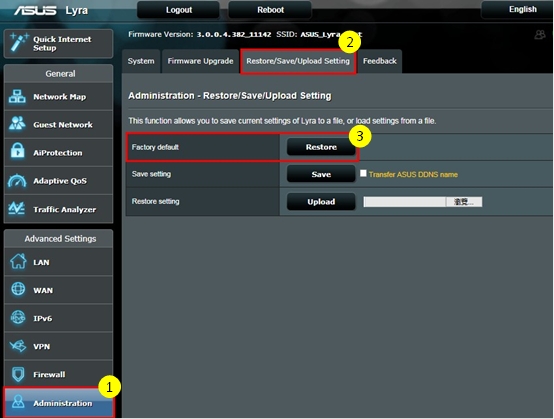
The LED indicator on the Lyra will turn solid white after roughly two minutes, indicating the reset process is completed.
If you reset your primary Lyra, all the remaining Lyra nodes will be disconnected from the Internet. If you want to reset the whole Lyra network, please refer to How to reset whole Lyra network.