[Game Profile] Introduction of Game Profile
Game Profile
Game Profile is useful when playing console games or some PC games. There might be some connection issues due to either ISP or router setting in your environment (NAT blocks and port blocks). For selected games and apply profile, using Game Profile helps you to ensure that game connection will not be blocked by GT-AC5300.
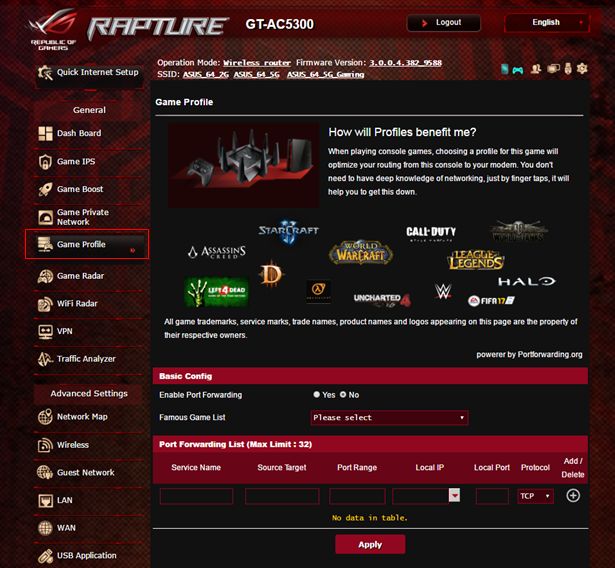
Please follow below steps:
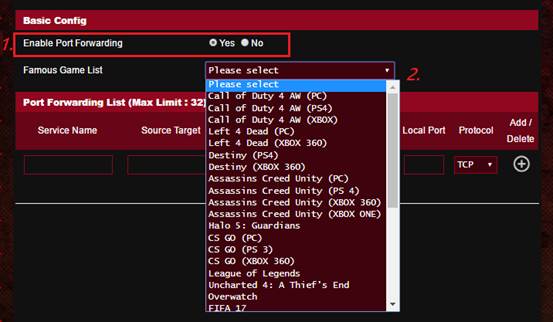
1. Please select “Yes” to enable Port Forwarding.
2. Choose a game from [Famous Game List]. Game List will be updated from time to time.
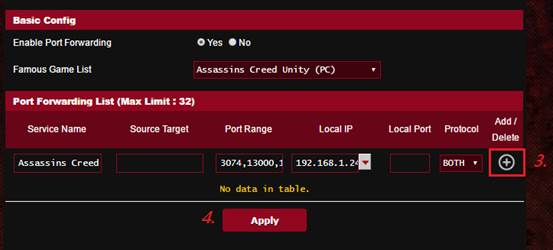
3. Click “+” button after you complete the step 1 and 2.
4. Click [Apply] to apply configuration to all profiles.
How to get the (Utility / Firmware)?
You can download the latest drivers, software, firmware and user manuals in the ASUS Download Center.
If you need more information about the ASUS Download Center, please refer this link.