[IP camera]How do I check if my ZenEye Cam is offline?
Once your ZenEye Cam has been paired with your Base Station, check the Camera LED indicator on the front of your Base Station:
1. If the Camera LED is off, your ZenEye Cam has been disconnected from the Base Station.
Place your ZenEye Cam near the Base Station, then check the camera's battery status.
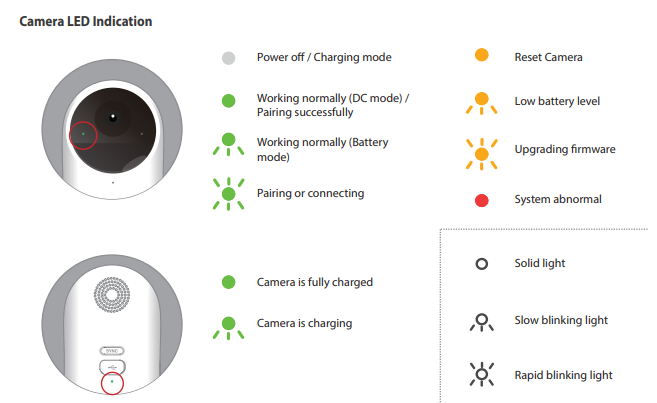
2. If the ZenEye Cam Status LED on the front of the camera is Blinking yellow, it means the camera's battery level is lower than 10%.
If the battery level is lower is than 1%, the LED will turn red and the camera will be turned off.
You can also check the connection status of your ZenEye Cam using the ASUS ZenEye App.
1. If you see "ZenEye Cam is offline" on the Viewer page, your ZenEye Cam has been disconnected from the Base Station.
2. You can also check your notifications to see ZenEye Cam related messages.
For more product information, please refer to https://www.asus.com/Networking-IoT-Servers/Smart-Home/All-series/ASUS-ZenEye/