Product
ZenEye
[IP camera] How do I reset my ZenEye Cam?
Follow the steps below to reset your ZenEye Cam:
1. Open the ASUS ZenEye App and go to Camera Settings.
2. On the settings page, tap "Remove" to reset your ZenEye Cam.
You can also reset your ZenEye Cam using the camera's Sync button:
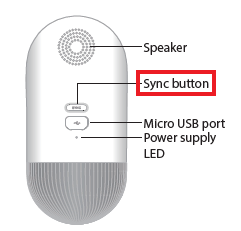
1. Press the Sync button for 5 seconds.
2. Wait until the status LED has turned Solid Amber.
3. The status LED will turn off, once the reset process has finished.
After resetting your camera, perform the pairing process with your Base Station.
For more product information, please refer to https://www.asus.com/Networking-IoT-Servers/Smart-Home/All-series/ASUS-ZenEye/