[NUC] Multiple Displays for NUC Kits NUC11PHKi7C and NUC11PHKi7CAA
The most common multiple display configuration options for the following NUC Products:
NUC NUC 11 Extreme Kit - NUC11PHKi7C and NUC11PHKi7CAA have the following:
- One mini DisplayPorts (1.4-compliant)
- One HDMI ports (2.0 compliant)
- Two USB Type C ports
See the Processor Graphics subsystem section of the Technical Product Specification document for your NUC for additional information.
Before You Begin
We recommend you first update your NUC to the latest:
- BIOS and HD Graphics driver, using Driver & Support Assistant
- Nvidia Graphics driver
- Thunderbolt™ 3 Controller firmware
Two displays
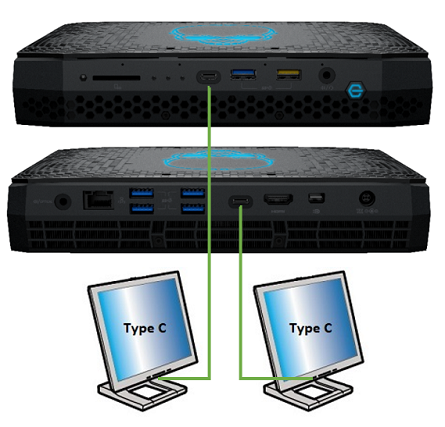
| Display | NUC port | TV/monitor port | Maximum supported resolution |
| 1 | USB Type C | USB Type C | 4096x2160 at 60Hz |
| 2 | USB Type C | USB Type C | 4096x2160 at 60Hz |
| Note | This configuration utilizes Graphics from the integrated Iris® Xe Graphics card only. |
Or

| Display | NUC port | TV/monitor port | Maximum supported resolution |
| 1 | Mini DisplayPort | DisplayPort | 4096x2160 at 60Hz |
| 2 | HDMI | HDMI | 4096x2160 at 60Hz |
| Note | This configuration utilizes Graphics from Nvidia GeForce RTX 2060 discrete graphics card only. |
Or
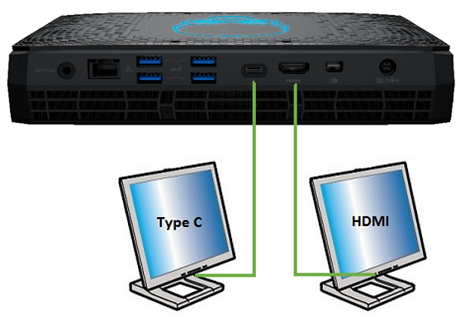
| Display | NUC port | TV/monitor port | Maximum supported resolution |
| 1 | USB Type C | USB Type C | 4096x2160 at 60Hz |
| 2 | HDMI | HDMI | 4096x2160 at 60Hz |
| Note | This configuration utilizes Graphics from integrated Iris® Xe Graphics card and Nvidia GeForce RTX 2060 discrete graphics card. |
Or

| Display | NUC port | TV/monitor port | Maximum supported resolution |
| 1 | USB Type C | USB Type C | 4096x2160 at 60Hz |
| 2 | Mini DisplayPort | DisplayPort | 4096x2160 at 60Hz |
| Note | This configuration utilizes Graphics from integrated Iris® Xe Graphics card and Nvidia GeForce RTX 2060 discrete graphics card. |
Three or four displays
Any combination of available ports:
- USB Type C: 4096x2160 at 60Hz
- Mini DisplayPort: 4096x2160 at 60Hz
- HDMI: 4096x2160 at 60Hz