[NUC] How to Switch Between Integrated Graphics and NVIDIA* Discrete Graphics Card in NUC NUC11PH
Resolution
| Note |
|
Windows Graphics Settings:
- Click the Windows Start Menu
- Type "graphics settings".
- Under the Graphics performance preference section the graphics processor can be assigned to specific applications.

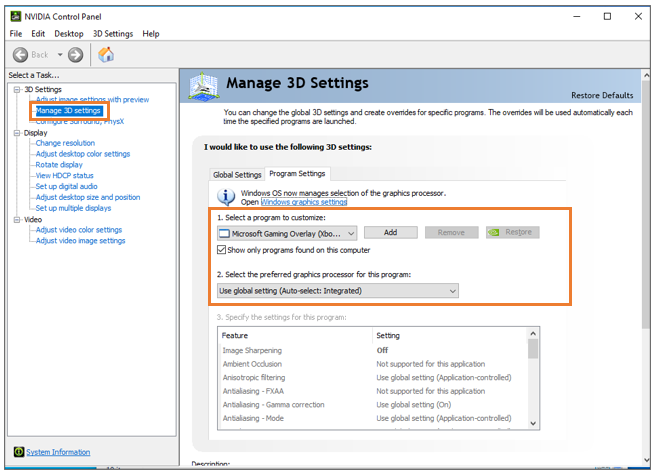
NVIDIA* Control Panel:
- Open the NVIDIA* Control Panel.
- Under 3D Settings select Manage 3D Settings.
- Click the Program Settings tab
- Select the program you want to choose a graphics card for from the drop-down list.
- Select the preferred graphics processor in the drop-down list. If you want to use the integrated graphics card, select Integrated Graphics.