[NUC] NUC Repeatedly Reboots when External USB Drives are Connected
Resolution
This may be happening due to the USB Port detection and interference with the normal boot process. Try the following to resolve the issue.
Change the USB port detection in BIOS:
- Press F2 during boot to enter BIOS Setup.
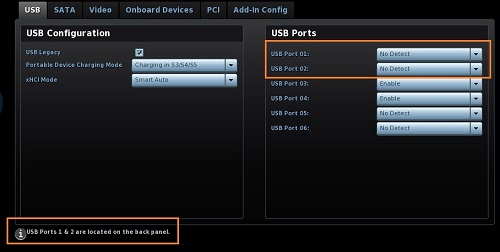
- Go to Advanced > Devices > USB.
- In the USB Ports pane, identify the ports the external drives are connected to.
- Set those ports to No Detect.
- Press F10 to save and exit BIOS Setup.
Caution  | Keep the ports your keyboard and mouse are connected to enabled. |