[NUC] คุณสมบัติของ Thunderbolt™ 3 บนชุด NUC และ Mini PC
คุณสมบัติ Thunderbolt™ 3 บน NUC Kits และ Mini PCs
- พลังงานอุปกรณ์ภายนอก - สูงสุดถึง 15W (ฮับ, ฮาร์ดไดร์ฟ, อินเตอร์เฟซเสียง เป็นต้น)
- การเชื่อมต่อแบบเชือมได้สูงสุดถึง 6 อุปกรณ์ (ไม่รวมจอภาพ)
- การรองรับ Plug-and-Play ของการ์ดกราฟิกภายนอก (eGPU) (เช่น Razer Core*, PowerColor Devil Box)
- ความเร็วในการถ่ายโอนข้อมูลสูงสุดถึง 40 Gbps
- การเชื่อมต่อเครือข่าย Thunderbolt™
- สายเชื่อมต่อมีความสมมาตร/สามารถหมุนได้ - ไม่มีทางผิดในการเสียบ
- การรองรับ DisplayPort Alternate Mode (DP Alt Mode)
ตารางต่อไปนี้แสดงว่า NUC รุ่นไหนมี Thunderbolt™ 3 และรองรับจอภาพได้กี่จอด้วยอะแดปเตอร์จอเดียวถึงจอสองจอ
| โมเดล Intel NUC | จำนวนจอภาพที่รองรับด้วยอะแดปเตอร์จอเดียวถึงจอสองจอ+ |
| NUC10i7FN, NUC10i5FN, NUC10i3FN | 1 |
| NUC9VXQNX, NUC9V7QNX, NUC9i9QNX, NUC9i7QNX, NUC9i5QNX | 2 |
| NUC8v7PN, NUC8v5PN, NUCi3PN | 1 |
| NUC8i3BEH, NUC8i3BEK NUC8i5BEH, NUC8i5BEK NUC8i7BEH, NUC8i7BEK | 1 |
| NUC8i7HNK, NUC8i7HVK | 2 |
| NUC7i5BNH, NUC7i5BNK NUC7i7BNH | 1 |
| NUC6i7KYK | 1 |
ตัวอย่างของ การใช้งาน Thunderbolt™ 3 บน NUC
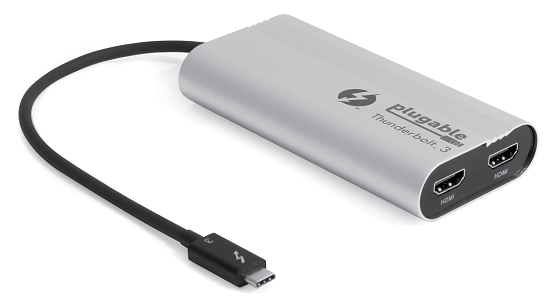
อะแดปเตอร์แสดงผลจอเดี่ยวเป็นสองจอ
คุณสามารถเชื่อมต่อคอมพิวเตอร์ของคุณกับจอเป็นสองจอได้โดยใช้อะแดปเตอร์แสดงผลจอเดี่ยวเป็นสองจอ อย่างไรก็ตาม คุณต้องตรวจสอบว่าคอมพิวเตอร์ของคุณมีพอร์ต Thunderbolt™ 3 หรือไม่ โดยอะแดปเตอร์ Thunderbolt™ 3 จะทำงานได้กับพอร์ต Thunderbolt™ 3 เท่านั้น
ดูตัวอย่างอะแดปเตอร์ Thunderbolt™ 3 แสดงผลจอเดี่ยวเป็นสองจอในภาพด้านล่าง:
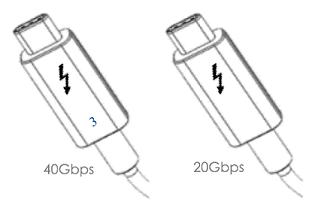
ไม่ใช่สายโทรศัพท์ทั่วไป สาย Thunderbolt ที่มีตัวเลข 3 บนตัว สามารถรองรับความเร็วสูงสุด 40 Gbps ได้ ส่วนสายที่ไม่มีตัวเลข 3 บนตัว สามารถรองรับความเร็วสูงสุด 20 Gbps ได้ ดูตัวอย่างในภาพด้านล่าง:
| Note | เฉพาะ Windows® 10 เท่านั้นที่สามารถรองรับการใช้งานกราฟิกภายนอกได้ การเชื่อมต่อ Thunderbolt™ 3 เป็นการเชื่อมต่อแบบ Single-link |