[Telefone] Como ativar e definir a função Notificações?
[Telefone] Como ativar a função Notificações para os aplicativos?
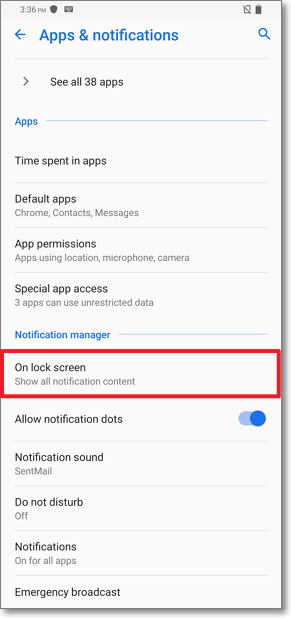
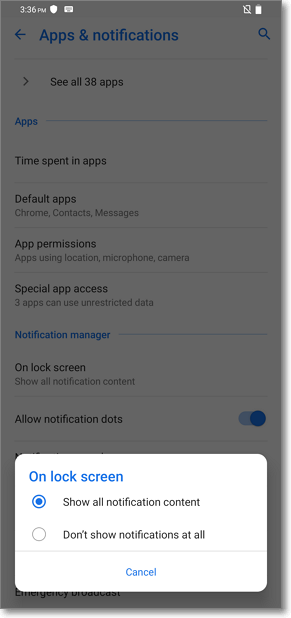
[Telefone] Como ativar a função de notificações na tela de bloqueio?
[Telefone] Como ativar a função Notificações para os aplicativos?
1. Siga as etapas abaixo para ativar a função:
No Android 7.0: vá em "Configurações" > "Notificações"
No Android 8.0: vá em "Configurações" > "Aplicativos e notificações" > "Notificações"
No Android 9.0: vá em "Configurações" > "Aplicativos e notificações" > "Notificações"
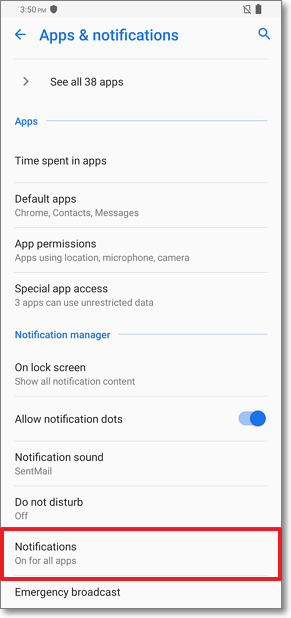
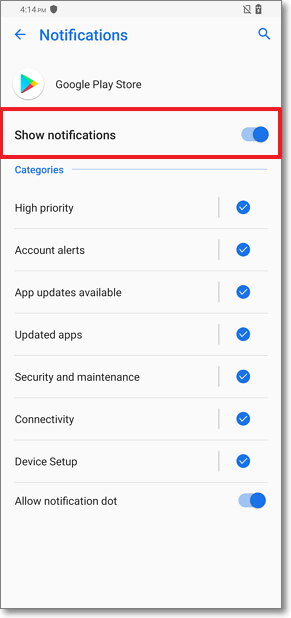
2. Ative os apps em que você deseja ativar a função de notificações
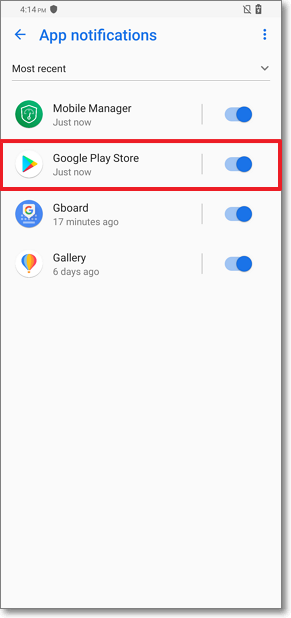
3. Ative a opção "Mostrar notificações" para ativar a função Notificações para os aplicativos
[Telefone] Como ativar a função de notificações na tela de bloqueio?
1. No Android 8.0/9.0: vá em "Configurações" > "Aplicativos e notificações" "Na tela de bloqueio"
2. Clique em "Na tela de bloqueio". Você pode ativar a função selecionando "Mostrar todo o conteúdo das notificações" ou selecionar "Não mostrar notificações" para desativar a função.