
[NUC] Los puertos del panel frontal en algunos modelos de NUC 11 y NUC 12 no funcionan.
Resumen
Cómo solucionar los problemas del panel frontal en los kits NUC 11 Extreme / Elementos de cálculo extremo NUC 11 y kits NUC 12 Extreme / Elemento de cálculo extremo NUC 12Descripción:Los puertos USB, la tarjeta SD y el conector de audio de 3,5 mm en el panel frontal no funcionan.Resolución:El panel frontal utiliza un controlador USB integrado de Windows para funcionar. Si los puertos no funcionan, es probable que el cable no esté conectado correctamente.En el kit NUC 11 Extreme - NUC11BTM / NUC 11 Extreme Compute Element - NUC11DBB, hay un cable que debe conectarse para que funcione el panel frontal. 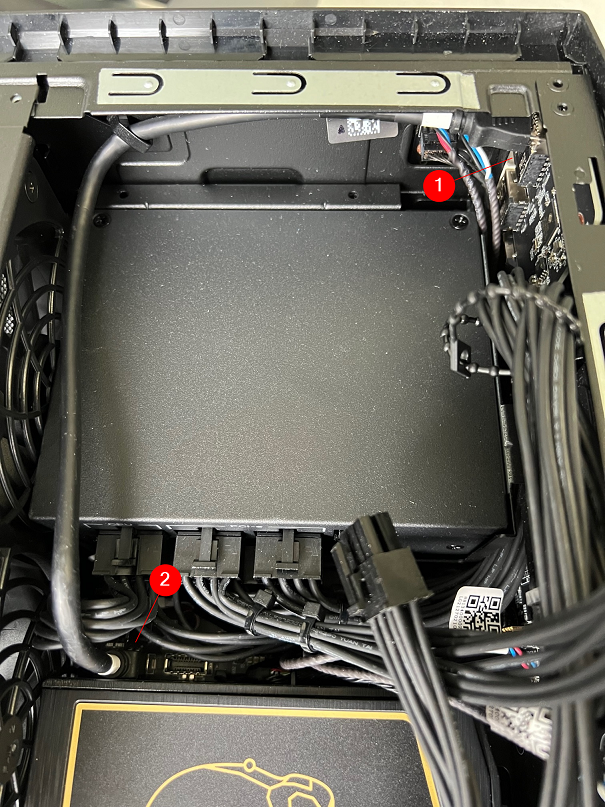
En los kits NUC 12 Extreme - NU12DCM / NUC 12 Extreme Compute Element - NUC12EDB, hay dos cables que deben conectarse para que funcione el panel frontal. 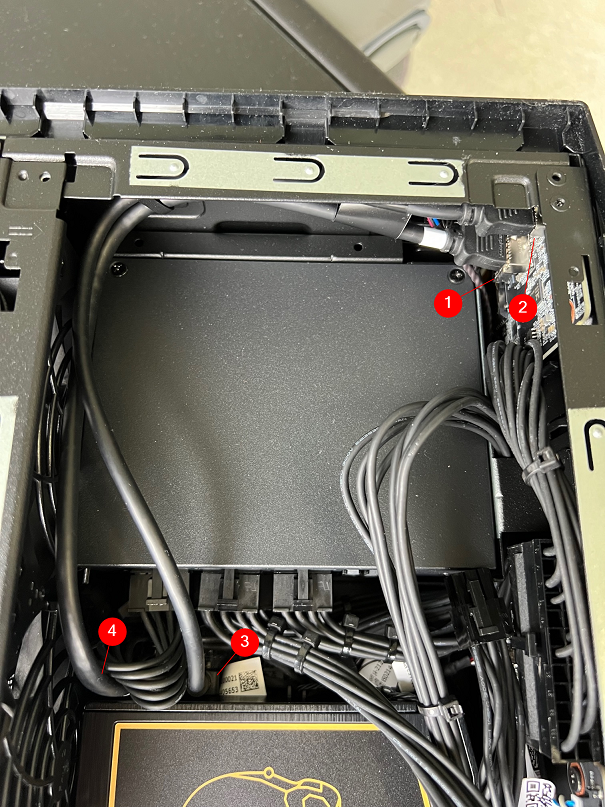
En los Kits NUC 12 Extreme - NU12DCM / NUC 12 Extreme Compute Element - NUC12EDB, hay dos cables que deben conectarse para que el panel frontal funcione.
- Above information might be partly or entirely quoted from exterior websites or sources. please refer to the information based on the source that we noted. Please directly contact or inquire the sources if there is any further question and note that ASUS is neither relevant nor responsible for its content/service
- This information may not suitable for all the products from the same category/series. Some of the screen shots and operations could be different from the software versions.
- ASUS provides the above information for reference only. If you have any questions about the content, please contact the above product vendor directly. Please note that ASUS is not responsible for the content or service provided by the above product vendor.