How to install intel LGA4677/LGA4710 CPU and Heatsink?
Precautions Before Installation:
1. It is recommended to wear an anti-static wrist strap or touch a properly grounded object before handling components.
2. Please ensure the power is turned off before installing or removing the motherboard.
3. Whenever you remove any components, place them on a grounded anti-static mat or in the bag provided with the components.
4. When handling parts, hold them by the edges and avoid directly touching the ICs.
*Note: LGA4677 and LGA4710 CPU carrier brackets each have two different models. Please secure the specific CPU to the corresponding carrier.
LGA4677
E1A: For intel 112-lane CPUs (W-3500 / W-3400 processors)
E1B: For intel 64-lane CPUs (W-2500 / W-2400 processors)
LGA4710
E2A: For intel Xeon 690 series processors
E2B: For intel Xeon 670 / 650 / 630 series processors
For intel CPU specifications, please refer to the following link: https://ark.intel.com/
LGA4677:(Carrier)

LGA4710:(Carrier)

Example: intel 112-lane CPU (W-3400 processors) = E1A. The corresponding carrier marking “E1A” can also be found on the CPU.

Step 1: Align the removal lever in the same direction as the fan.

Note: Please install according to the cooling module purchased by the user.
Step 2: Gently press down on the four corners of the carrier to ensure the latches are properly secured to the heatsink and that it sits evenly.

(Correct Installation Diagram)
Step 3: Insert the CPU into the carrier socket first, then gently press down to secure the CPU.

Step 4: Align the assembled CPU and carrier with the triangle alignment mark on the CPU socket of the motherboard. Carefully place it into position, then press down the four corner latches to secure it.
(Example: ASUS Pro WS W790-ACE)

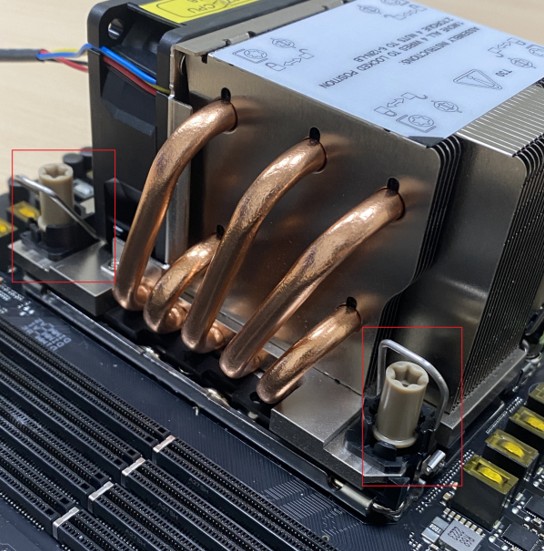
Note: Different cooling modules may have slight variations. Please follow the installation instructions according to the cooling module selected by the user.
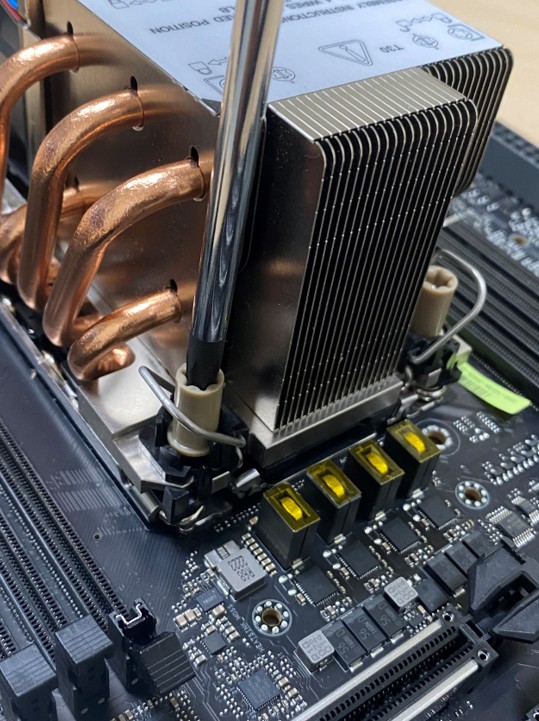
Step 5: Use a screwdriver tool (T30 x 100 mm) to tighten the four screws. The installation is now complete.
Q&A


Enter the corresponding CPU number into the Intel website below to check the CPU specifications and the matching package carrier.
https://ark.intel.com/ (Example: CPU W9-3495X; Package Carrier: E1A)


Alternatively, you may refer to the CPU markings to find the package carrier (E1A).