[Notebook] Customer Induced Damage (CID) criteria
Last Update : 2020/12/18
ASUS does not warrant uninterrupted or error-free operation of this Product. The warranty only covers technical hardware issues during the Warranty Period and in normal use conditions. It applies to firmware issues but not to any other software issues or customer induced damages or circumstances such as but not limited to:
- Outer Surface (Case) - Damage
- Keyboard - Keycap dropped off
- Keyboard - Keycap dropped off (hook or scissor feet damaged)
- Keyboard - Abraded/Worn off keys
- LCD panel - Surface crack
- LCD panel - Liquid crystal damaged
- LCD panel - Scratch & Abrasion
- Touch PAD - Damage
- I/O port - Damage
- Accessory - Adapter/Mouse damage
- Accessory - Connector damage/metal oxidation
- Label - Damage
|
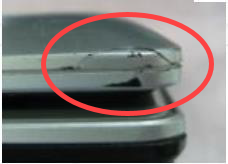
1. Outer Surface (Case) - Damage
|
|
Comments
|
Solution
|
Unit Under Warranty
|
Unit Out of Warranty
|
|
Surface scratch, or crack due to external force.
|
Exchange LCD bezel, LCD cover, top case, or bottom case
|
Charge to Customer
|
Charge to Customer
|

|
2. Keyboard - Keycap dropped off
|
|
Comments
|
Solution
|
Unit Under Warranty
|
Unit Out of Warranty
|
|
The Keycap of Keyboard dropped off and the customer preserves the keycap when sending in for RMA. If customer does not preserve keycap, keyboard repair considered out of warranty.
|
Reinstall Keycap or exchange the keyboard module
|
Covered under Warranty
|
Charge to Customer
|


|
4. Keyboard - Abraded/Worn off keys
|
|
Comments
|
Solution
|
Unit Under Warranty
|
Unit Out of Warranty
|
|
The keyboard or keyboards keys are abraded or worn off.
|
Exchange the keyboard module
|
Covered under Warranty
|
Charge to Customer
|


|
5. LCD panel - Surface crack
|
|
Comments
|
Solution
|
Unit Under Warranty
|
Unit Out of Warranty
|
|
The LCD panel has cracked on the surface with an impact point.
|
Exchange the LCD panel
|
Charge to Customer
|
Charge to Customer
|


|
6. LCD panel - Liquid crystal damaged
|
|
Comments
|
Solution
|
Unit Under Warranty
|
Unit Out of Warranty
|
|
There is a wide-area dark spot, but LCD panel glass is not damaged.
|
Exchange the LCD panel
|
Covered under Warranty
|
Charge to Customer
|


|
7. LCD panel - Scratch & Abrasion
|
|
Comments
|
Solution
|
Unit Under Warranty
|
Unit Out of Warranty
|
|
Surface scratch or abrasion on surface panel.
|
Exchange the LCD panel
|
Charge to Customer
|
Charge to Customer
|

|
8. Touch PAD - Damage
|
|
Comments
|
Solution
|
Unit Under Warranty
|
Unit Out of Warranty
|
|
The Touch PAD shows visual evidence of external force or impact.
|
Exchange the Touch PAD
|
Charge to Customer
|
Charge to Customer
|

|
9. I/O port - Damage
|
|
Comments
|
Solution
|
Unit Under Warranty
|
Unit Out of Warranty
|
|
Device received with visual evidence of damage to I/O board by forced insertion or removal of external plug-in device.
|
Exchange related parts
|
Charge to Customer
|
Charge to Customer
|


|
10. Accessory - Adapter/Mouse damage
|
|
Comments
|
Solution
|
Unit Under Warranty
|
Unit Out of Warranty
|
|
The Adapter/Mouse's surface or cable is damaged due to external force.
|
Exchange the Adapter or Mouse
|
Charge to Customer
|
Charge to Customer
|


|
11. Accessory - Connector damage/metal oxidation
|
|
Comments
|
Solution
|
Unit Under Warranty
|
Unit Out of Warranty
|
|
The connector is damaged or metal oxidation is found due to usage or storage.
|
Exchange the Adapter or Mouse
|
Charge to Customer
|
Charge to Customer
|


|
12. Label - Damage
|
|
Comments
|
Solution
|
Unit Under Warranty
|
Unit Out of Warranty
|
|
The serial number label on unit is removed, scribbled on, seriously damaged, or unreadable.
|
Buy new parts
|
If the Serial Number can be identified that it's ASUS product → Covered under Warranty
If the Serial Number can't be identified → Charge to Customer
|
Charge to Customer
|
