[NUC] NUCキットNUC8v7PN、NUC8v5PN、およびNUC8i3PNの複数のディスプレイ構成オプション
このガイドでは、最も一般的な複数ディスプレイの設定オプションを提供します。
NUCキットNUC8v7PN、NUC8v5PN、NUC8i3PNには、次のものがあります。
- 2つのHDMIポート(2.0b準拠)
- 1つのタイプCポート
重要!「HDMI 2」ポートとタイプCポートを同時にディスプレイに使用することはできません。
追加情報については、インテルNUCのプロセッサグラフィックスサブシステムセクションをTechnical Product Specificationドキュメントで参照してください。以下が含まれます。
- マルチストリームトランスポートデイジーチェーン
- タイプC経由のDisplayPort
始める前に
Driver & Support Assistantを使用して、最新のBIOSおよびHDグラフィックスドライバーにIntel NUCを最初に更新することをお勧めします。
2つのディスプレイ

| ディスプレイ | Intel NUCポート | TV /モニターポート | サポートされる最大解像度 |
| 1 | HDMI | HDMI | 60Hzで4096x2160 |
| 2 | HDMI | HDMI | 60Hzで4096x2160 |
または
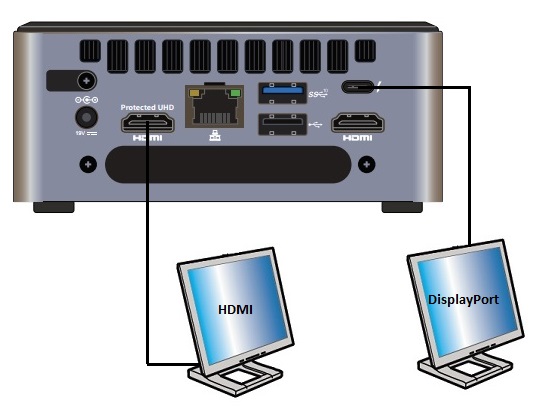
| ディスプレイ | Intel NUCポート | TV/モニターポート | 最大サポート解像度 |
| 1 | HDMI | HDMI | 4096x2160 at 60Hz |
| 2 | Type C | DisplayPort | 4096x2160 at 60Hz |
3つのディスプレイ
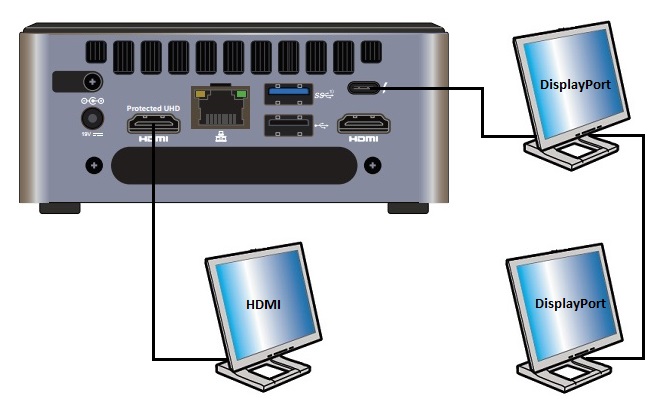
| ディスプレイ | Intel NUCポート | TV/モニターポート | 最大サポート解像度 |
| 1 | HDMI | HDMI | 4096x2160 at 60Hz |
| 2 | Type C | DisplayPort | 4096x2160 at 60Hz |
| 3 | N/A | デイジーチェーン:最初のモニターのDisplayPort OUTから2番目のモニターのDisplayPort INまで | 4096x2160 at 60Hz |
または
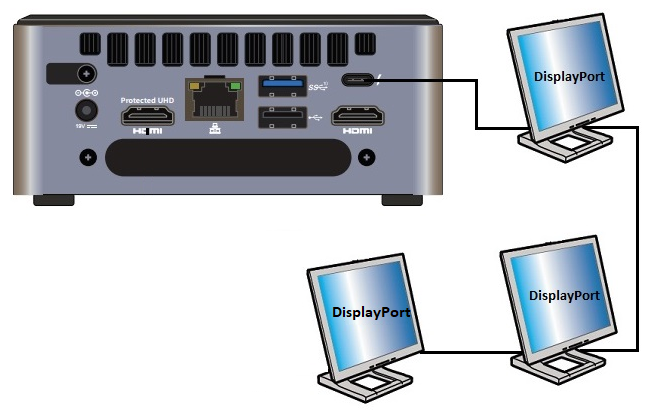
| ディスプレイ | Intel NUCポート | TV/モニターポート | 最大サポート解像度 |
| 1 | タイプC | DisplayPortまたはタイプC | 60Hzで4096x2160 |
| 2 | N/A | デイジーチェーン:最初のモニターのDisplayPort OUTから2番目のモニターのDisplayPort INへ | 60Hzで4096x2160 |
| 3 | N/A | デイジーチェーン:2番目のモニターのDisplayPort OUTから3番目のモニターのDisplayPort INへ | 60Hzで4096x2160 |
デイジーチェーンとは、1つの接続を使用して複数のモニターを接続することができる機能を指します。すべてのディスプレイとすべてのケーブルは、DisplayPort 1.2仕様をサポートする必要があります。
| 関連トピック |
| Intel NUCディスプレイ接続用ケーブルおよびビデオアダプター |
| 複数のディスプレイFAQ |
| 拡張デスクトップモードの有効化方法 |
サポートにお問い合わせ
上記の情報で問題が解決しない場合は、お問い合わせください。
- Above information might be partly or entirely quoted from exterior websites or sources. please refer to the information based on the source that we noted. Please directly contact or inquire the sources if there is any further question and note that ASUS is neither relevant nor responsible for its content/service
- This information may not suitable for all the products from the same category/series. Some of the screen shots and operations could be different from the software versions.
- ASUS provides the above information for reference only. If you have any questions about the content, please contact the above product vendor directly. Please note that ASUS is not responsible for the content or service provided by the above product vendor.