
[NUC] NUC11BTM/NUC12DCMおよびNUC Enthusiast NUC11PHKi7CのSkullスプラッシュスクリーンを削除する方法
要約
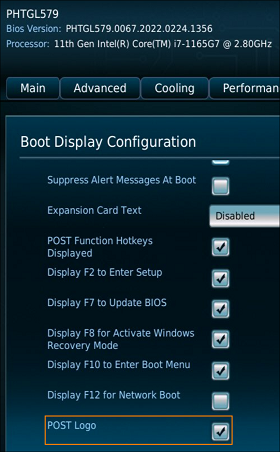
説明 NUC11BT、NUC12DCM、NUC Enthusiast Kit/Mini PC - NUC11PHKi7Cのスカル・スプラッシュ・スクリーンを除去する手順について説明します。 手順 De-select the BIOS option, POST Logo. BIOSオプション、POSTロゴを選択解除します。
サポートにお問い合わせ
上記の情報で問題が解決しない場合は、お問い合わせください。
- Above information might be partly or entirely quoted from exterior websites or sources. please refer to the information based on the source that we noted. Please directly contact or inquire the sources if there is any further question and note that ASUS is neither relevant nor responsible for its content/service
- This information may not suitable for all the products from the same category/series. Some of the screen shots and operations could be different from the software versions.
- ASUS provides the above information for reference only. If you have any questions about the content, please contact the above product vendor directly. Please note that ASUS is not responsible for the content or service provided by the above product vendor.