[Computer Chassis] ROG Hyperion GR701 installation EATX motherboard notes
Notice
1. Kindly wear gloves to protect your hands before proceeding with disassembly or assembly. Pay special attention to the corners of the parts to avoid any scratches.
2. When the side panel or front panel is made of glass, please handle it with extreme care during disassembly to avoid any collisions, falls, or undue stress.
3. When disassembling, please lay the casing flat on a stable surface to prevent the side panel from falling during the process.
4. Kindly ensure that the relevant wires are neatly arranged during assembly to prevent any damage to the wires throughout the process.
5. Keep track of all screws and small components during disassembly and assembly to avoid losing any parts.
Please adjust the sequence of installation.
1. Remove VGA holder
(1) Remove the screws of the VGA holder.
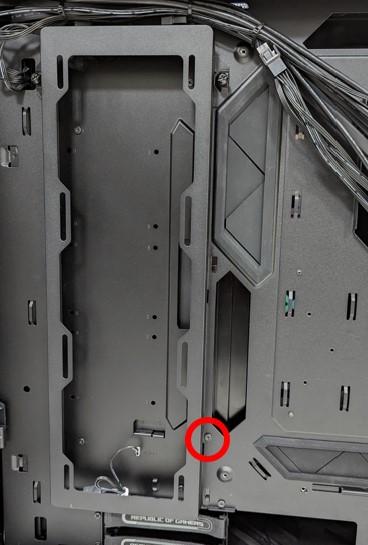
(2) Pull the VGA holder upwards to remove it.
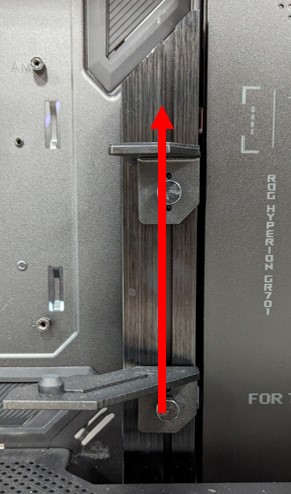
2. After removing VGA holder, MB can fit into chassis directly (No need to remove rear 14CM fan).
3. After MB installed, put VGA holder back if needed.
Visit ASUS official website to learn more about ROG Hyperion GR701 https://rog.asus.com/cases/rog-hyperion-gr701-model/